---
title: "Step 12: Add a palette command"
space: "Commera"
url: "https://docs.bwh.tech/commera/build-a-plugin/add-a-palette-command"
updated: "2026-10-09"
---
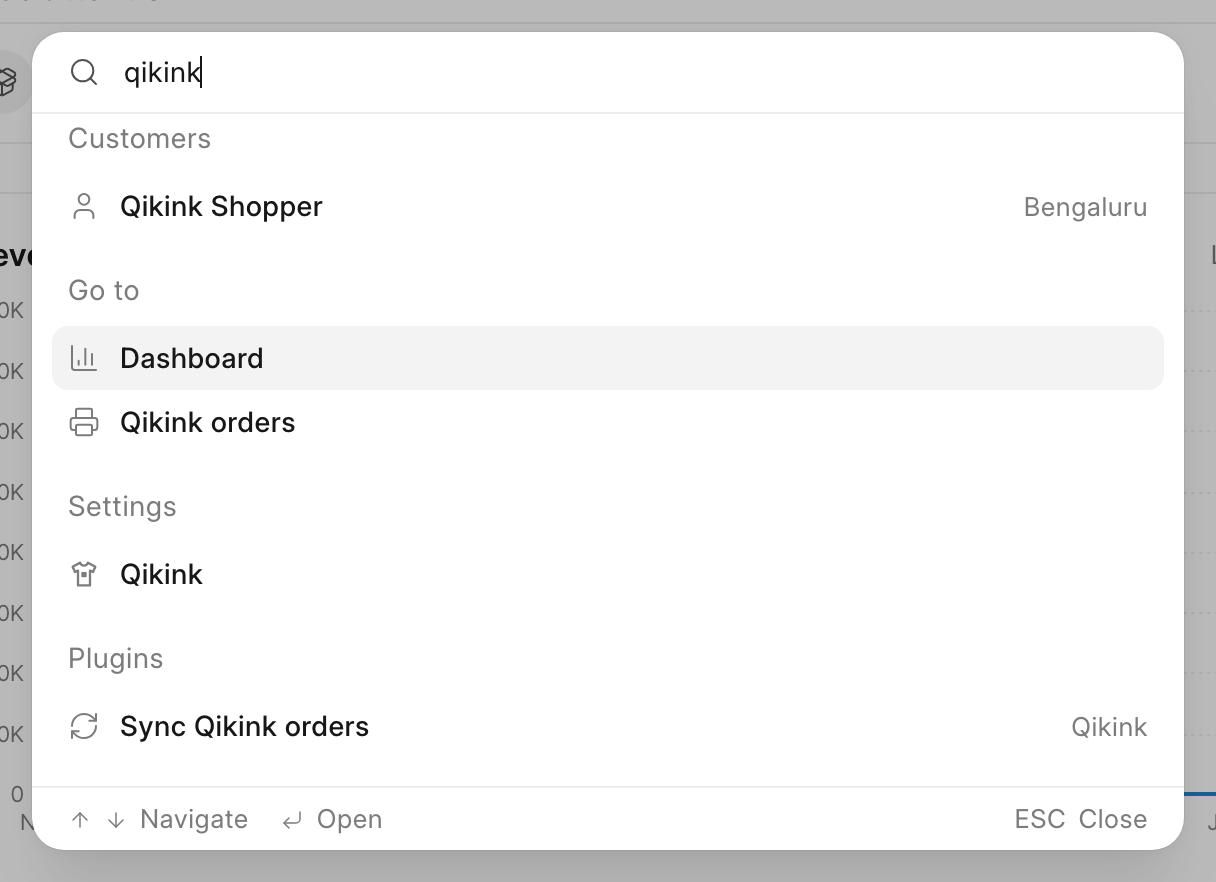
In this step, you add a **Sync Qikink orders** command to the search palette in `/commera`. Staff press Cmd+K (Ctrl+K on Windows and Linux), type "qikink", and run the status sync from any page.
Code for this step: [feat: add a sync qikink orders command to the palette](https://github.com/Rl0007/commera_qikink/commit/6dc8443)
## What you'll build
- `commera/commands/sync-orders/index.vue`, a row in the palette's **Plugins** group.
The command calls `sync_open_orders` in `api.py`, the same method as the **Sync now** button from [Add a Qikink orders page](/commera/build-a-plugin/qikink-orders-page). You write no Python in this step.
## 1. Add the command
In `apps/commera_qikink`, run `bench commera add command sync-orders`. Replace the `commera/commands/sync-orders/index.vue` it writes with this, and delete the `sync_orders` stub it adds to `api.py`: this command calls `sync_open_orders`.
```vue
```
`keywords` lists extra words that match the command. The plugin's title always matches, so "qikink" is there only for clarity.
## 2. Return the toast text
Commera calls `method()` with no arguments, because a command runs outside a record. When the method returns a string, Commera shows it in the success toast. For the other fields and rules, see [Commands](/commera/plugin-reference/dashboard-entries) in the reference.
`sync_open_orders` returns "Updated {0} orders from Qikink", so the toast shows the count:
```python
@frappe.whitelist(methods=["POST"])
def sync_open_orders() -> str:
frappe.has_permission("Sales Order", "write", throw=True)
return _("Updated {0} orders from Qikink").format(len(order_status.sync_open_orders()))
```
:::tip[Your pages are in the palette already]
Commera lists every plugin page in the palette's **Go to** group. Your **Qikink orders** page shows there with no command. Add a command only for something that a page link cannot do.
:::
:::note[Check the method's permission]
A command shows to every user who opens the palette. The `condition` only hides it. Keep the `frappe.has_permission` call in the method, because any user can call a whitelisted method directly.
:::
## Check it works
1. Run `bench build --app commera_qikink`.
2. Reload `/commera` and press Cmd+K.
3. Type `qikink`. The **Go to** group shows **Qikink orders**, and the **Plugins** group shows **Sync Qikink orders** with the suffix **Qikink**.
4. Click **Sync Qikink orders**. The palette closes, and a toast shows "Updated … orders from Qikink".
 ## Next steps
- [Step 13: Test and ship](/commera/build-a-plugin/test-and-ship)
- [Dashboard entries](/commera/plugin-reference/dashboard-entries)
- [Compatibility](/commera/plugin-reference/compatibility)
## Next steps
- [Step 13: Test and ship](/commera/build-a-plugin/test-and-ship)
- [Dashboard entries](/commera/plugin-reference/dashboard-entries)
- [Compatibility](/commera/plugin-reference/compatibility)