---
title: "Step 10: Handle cancellations"
space: "Commera"
url: "https://docs.bwh.tech/commera/build-a-plugin/handle-cancellations"
updated: "2026-10-09"
---
In this step, you stop a cancel that Qikink cannot follow. Qikink has no cancel API. After Qikink has an order, it prints and ships the order unless your staff cancel it on the Qikink dashboard. Your plugin refuses to cancel a sent order, and gives staff a **Mark cancelled on Qikink** action for the order that they cancelled on Qikink.
Code for this step: [feat: refuse to cancel an order qikink is printing until staff cancel it there](https://github.com/Rl0007/commera_qikink/commit/aff0ad8). Later tidied in [refactor: use frappe utilities across the app](https://github.com/Rl0007/commera_qikink/commit/a8fa754). The code on this page is the tidied version.
## What you'll build
- A Sales Order `before_cancel` hook that refuses to cancel a sent order.
- A function that cancels the drop-ship Purchase Order.
- `commera/order/actions/mark-cancelled-on-qikink/index.vue`, a row in the **More actions** menu.
- A change to the status sync, so that a manual refresh keeps **Cancelled**.
## 1. Cancel the drop-ship Purchase Order
Add `cancel_drop_ship_order` to `commera_qikink/purchase_orders.py`. It uses `get_drop_ship_purchase_orders` from [Keep status in sync](/commera/build-a-plugin/keep-status-in-sync):
```python
def cancel_drop_ship_order(sales_order: str):
# Must run before the order's own cancel: ERPNext's unlink_ref_doc_from_po blanks these links in on_cancel.
with as_plugin_user("commera_qikink"):
for name in get_drop_ship_purchase_orders(sales_order):
frappe.get_doc("Purchase Order", name).cancel()
```
:::caution[Cancel the Purchase Order before the Sales Order]
When ERPNext cancels a Sales Order, it clears the `sales_order` link on the lines of every Purchase Order that is not cancelled. After that, your plugin cannot find the drop-ship Purchase Order. Cancel it in `before_cancel` or before the order cancel. Do not cancel it in `on_cancel` or in an `order_cancelled` handler. A cancelled Purchase Order keeps its link.
:::
## 2. Refuse the cancel
Create `commera_qikink/cancellations.py`:
```python
import frappe
from frappe import _
from frappe.utils.data import cstr
from commera_qikink.order_status import is_final_status
from commera_qikink.orders import CANCELLED_STATUS
from commera_qikink.purchase_orders import cancel_drop_ship_order
def validate_cancel(doc, method=None):
if not doc.commera_qikink_order_number:
return
if is_cancelled_on_qikink(doc.commera_qikink_status):
cancel_drop_ship_order(doc.name)
return
if frappe.has_permission("Sales Order", "cancel", doc=doc):
frappe.throw(
_(
"Qikink is printing this order as Qikink order {0}, and it can't be cancelled from here. "
"Cancel it on the Qikink dashboard first, then use Mark cancelled on Qikink on this order."
).format(doc.commera_qikink_order_number),
title=_("Cancel it on Qikink first"),
)
frappe.throw(
_("This order is already being printed and can't be cancelled here. Contact the store."),
title=_("Order can't be cancelled"),
)
def is_cancelled_on_qikink(status: str | None) -> bool:
return cstr(status).casefold() == CANCELLED_STATUS.casefold()
```
The hook lets an unsent order cancel. It also lets the cancel run when the status is **Cancelled**: your staff marked it, or the status sync read it from Qikink. Then the hook cancels the Purchase Order first. In every other case, it throws one of two messages:
- A user with cancel permission on Sales Order, that is your staff, gets the steps to cancel on Qikink.
- Any other user, that is a shopper, gets "Contact the store".
Register the hook in `hooks.py` next to `set_drop_ship_lines`:
```python
doc_events = {
"Sales Order": {
"before_validate": "commera_qikink.orders.set_drop_ship_lines",
"before_cancel": "commera_qikink.cancellations.validate_cancel",
}
}
```
This is a plain Frappe `doc_events` hook. Commera adds no hook for it.
:::note[Write the message for shoppers]
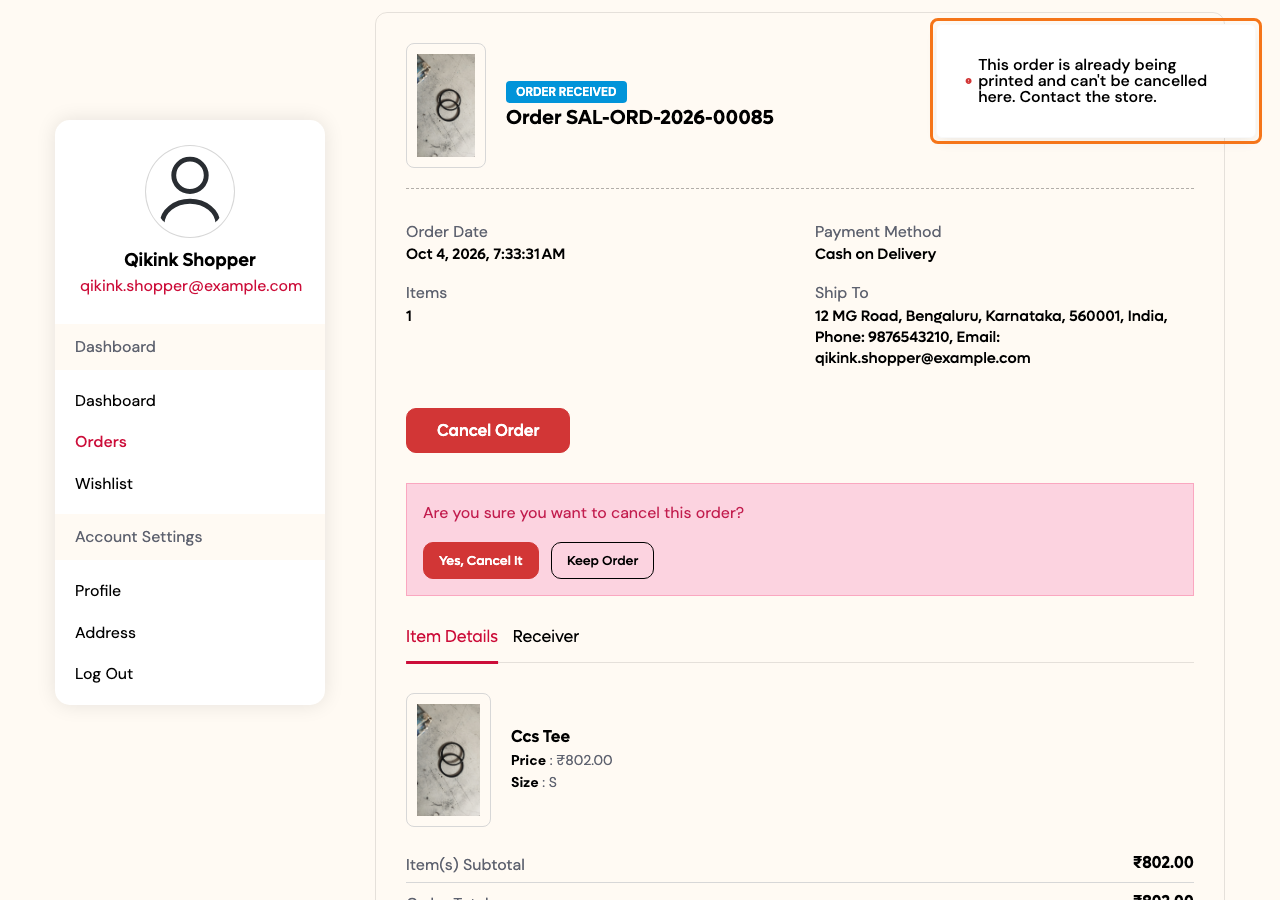
The storefront **Cancel Order** button cancels the Sales Order as the shopper. Commera shows the `frappe.throw` message from `before_cancel` as a toast, with no traceback. The shopper still sees **Cancel Order** on a sent order, so the message must tell them what to do.
:::
## 3. Mark an order cancelled on Qikink
Add these functions to `cancellations.py`:
```python
def mark_cancelled_on_qikink(sales_order: str):
order = frappe.get_doc("Sales Order", sales_order, for_update=True)
if not can_mark_cancelled(order):
frappe.throw(_("Order {0} is not an open Qikink order.").format(sales_order))
cancel_drop_ship_order(sales_order)
order.db_set("commera_qikink_status", CANCELLED_STATUS, update_modified=False)
order.add_comment("Info", _("Marked cancelled on Qikink"))
def can_mark_cancelled(order) -> bool:
return bool(
order.docstatus == 1
and order.commera_qikink_order_number
and not is_final_status(order.commera_qikink_status)
)
```
Add the method to `api.py`, and import `cancellations` there. Like every action method, it takes `name`:
```python
@frappe.whitelist(methods=["POST"])
def mark_cancelled_on_qikink(name: str) -> str:
frappe.has_permission("Sales Order", "cancel", doc=name, throw=True)
cancellations.mark_cancelled_on_qikink(name)
return _("Marked cancelled on Qikink. You can cancel order {0} now.").format(name)
```
Add the condition to `conditions.py`:
```python
from commera_qikink.cancellations import can_mark_cancelled
def can_mark_cancelled_on_qikink(doctype: str, name: str) -> bool:
order = frappe.db.get_value(
"Sales Order",
name,
["docstatus", "commera_qikink_order_number", "commera_qikink_status"],
as_dict=True,
)
return bool(order and can_mark_cancelled(order) and frappe.has_permission("Sales Order", "cancel", name))
```
In `apps/commera_qikink`, run `bench commera add order-action mark-cancelled-on-qikink`. Replace the `commera/order/actions/mark-cancelled-on-qikink/index.vue` it writes with this, and delete the `mark_cancelled_on_qikink_order` stub it adds to `api.py`: this action calls `mark_cancelled_on_qikink`.
```vue
```
:::caution[Use an icon from Commera's icon set]
`icon` must be a name from Commera's icon list (see [the plugin block](/commera/plugin-reference/dashboard-entries)). The list has no cancel or x icon, and `x-circle` fails the build. This action uses `list-checks`.
:::
## 4. Keep Cancelled final
The status sync from [Keep status in sync](/commera/build-a-plugin/keep-status-in-sync) already skips orders in `FINAL_STATUSES`, and `cancelled` is one of them. Move the check into a function in `order_status.py`, and use it in the open-orders filter:
```python
def is_final_status(status: str | None) -> bool:
return cstr(status).casefold() in FINAL_STATUSES
```
```python
if not is_final_status(row.commera_qikink_status)
```
Then make `refresh_order_status` return a final status without a call to Qikink. Otherwise **Refresh Qikink status** can replace **Cancelled** with Qikink's last status:
```python
def refresh_order_status(sales_order: str) -> str:
order_number, status = frappe.db.get_value(
"Sales Order", sales_order, ["commera_qikink_order_number", "commera_qikink_status"]
)
if not order_number:
frappe.throw(_("Order {0} has not been sent to Qikink.").format(sales_order))
if is_final_status(status):
return status
```
The rest of `refresh_order_status` does not change.
## Check it works
1. Run `bench build --app commera_qikink`, then restart the bench.
2. Place a COD order on the storefront as a shopper. Submit it in Desk, and send it with **Send to Qikink**.
3. As the shopper, open the order on the storefront and click **Cancel Order** > **Yes, Cancel It**. A toast shows "This order is already being printed and can't be cancelled here. Contact the store."
 4. In `/commera`, open the order and click **More actions** > **Mark cancelled on Qikink**. Confirm. The toast shows "Marked cancelled on Qikink. You can cancel order … now."
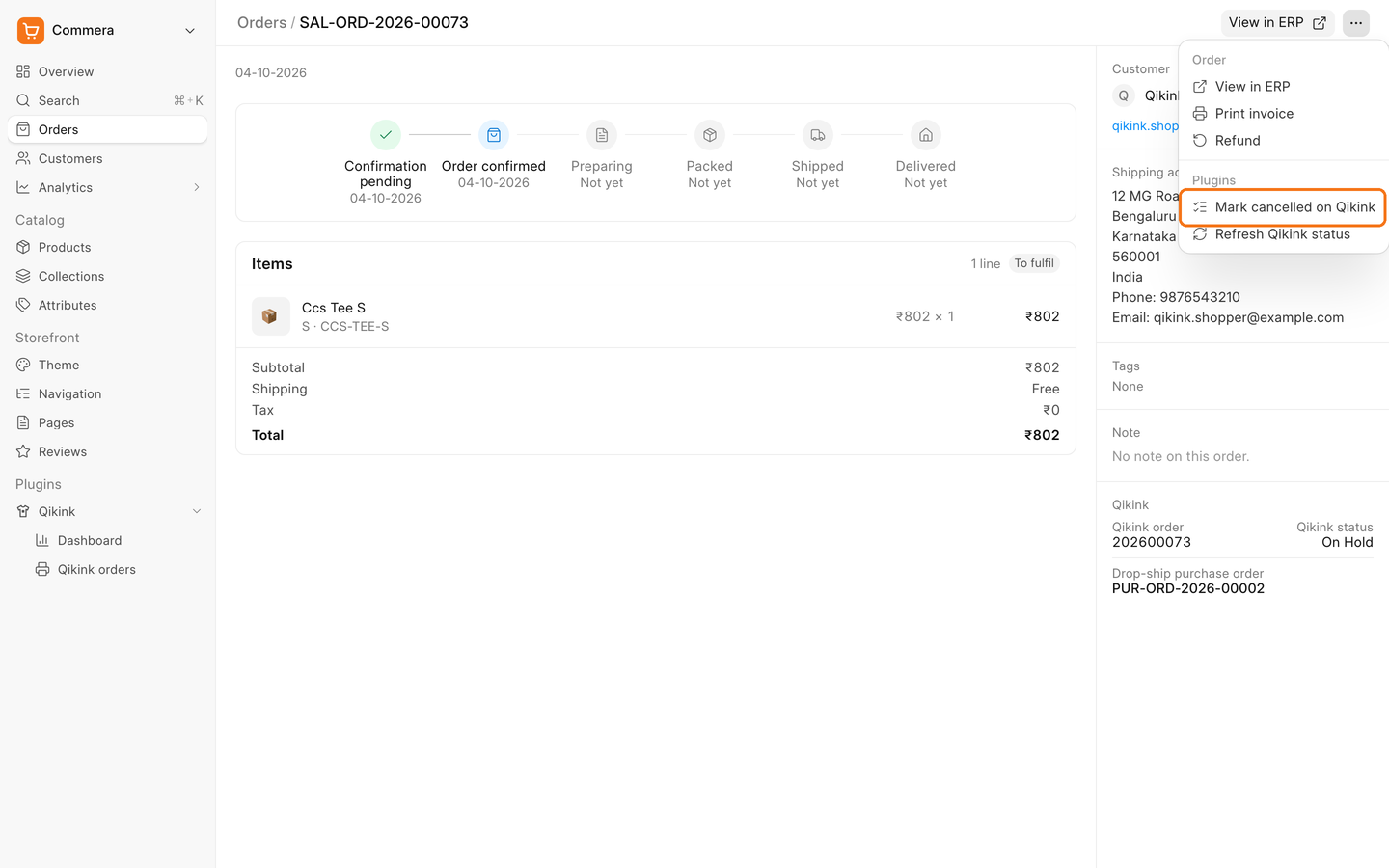 5. The **Qikink** card shows **Cancelled**, and the Purchase Order row is gone.
6. Open the order in Desk and click **Cancel**. The Sales Order and the Purchase Order are both cancelled.
## Next steps
- [Step 11: Add a Qikink orders page](/commera/build-a-plugin/qikink-orders-page)
- [Events](/commera/plugin-reference/events)
- [Gotchas](/commera/plugin-reference/gotchas)
5. The **Qikink** card shows **Cancelled**, and the Purchase Order row is gone.
6. Open the order in Desk and click **Cancel**. The Sales Order and the Purchase Order are both cancelled.
## Next steps
- [Step 11: Add a Qikink orders page](/commera/build-a-plugin/qikink-orders-page)
- [Events](/commera/plugin-reference/events)
- [Gotchas](/commera/plugin-reference/gotchas)