---
title: "Step 9: Keep status in sync"
space: "Commera"
url: "https://docs.bwh.tech/commera/build-a-plugin/keep-status-in-sync"
updated: "2026-10-09"
---
In this step, your plugin reads each open order's status from Qikink every hour. When Qikink reports an AWB, your plugin records a shipment on the order. When Qikink reports **Delivered**, your plugin marks the drop-ship Purchase Order as delivered. Commera then moves the order to Shipped and Delivered, and the shopper sees the tracking link.
Code for this step: [feat: keep qikink status and shipments in sync](https://github.com/Rl0007/commera_qikink/commit/a72457a). Later tidied in [refactor: call frappe's request helpers directly and parse replies with parse_json](https://github.com/Rl0007/commera_qikink/commit/4900622) and [refactor: use frappe utilities across the app](https://github.com/Rl0007/commera_qikink/commit/a8fa754). The code on this page is the tidied version.
```mermaid
sequenceDiagram
participant Job as Hourly job
participant Qikink
participant Plugin as commera_qikink
participant Commera
Job->>Plugin: sync_open_orders
Plugin->>Qikink: GET /api/order?page_no=N
Qikink-->>Plugin: status, awb, tracking_link
Plugin->>Plugin: save Qikink Status
Plugin->>Commera: record_shipment with awb and tracking_url
Plugin->>Plugin: on Delivered, deliver the drop-ship Purchase Order
```
## What you'll build
- `sync_open_orders`, an hourly job.
- A **Refresh Qikink status** action for one order.
- `deliver_drop_ship_order`, which marks the Purchase Order as delivered.
:::caution[Partner shipments need a recent bwh_shipping]
`record_shipment` without a shipping provider needs a bwh_shipping release with partner shipments. Older releases require a provider on each Shipping Request.
:::
## 1. Page through Qikink's orders
Qikink has no webhooks. Change `find_order` in the client to use a generator, so the sync can share it:
```python
def find_order(self, order_number: str) -> dict | None:
return next(
(order for order in self.iter_orders(MAX_ORDER_PAGES) if get_order_number(order) == order_number),
None,
)
def iter_orders(self, max_pages: int):
for page_no in range(1, max_pages + 1):
orders = self.request(make_get_request, "/api/order", params={"page_no": page_no})
if not orders:
return
yield from orders
```
Qikink returns 10 orders a page, newest first. Stop reading pages when every open order is found.
## 2. Save the status and the shipment
Create `commera_qikink/order_status.py`. Map Qikink's courier statuses to Shipping Request statuses. The commit has the full table.
```python
import frappe
from commera.sdk import as_plugin_user
from commera.sdk import orders as commera_orders
from frappe import _
from frappe.utils.data import cstr
from commera_qikink.client import Qikink, get_order_number
from commera_qikink.purchase_orders import deliver_drop_ship_order
MAX_SYNC_PAGES = 20
FINAL_STATUSES = {"delivered", "returned", "partially returned", "cancelled", "archived", "lost"}
SHIPMENT_STATUSES = {
"picked up": "In Transit",
"in-transit": "In Transit",
"out for delivery": "Out For Delivery",
"not attempted": "Undelivered",
"delivered": "Delivered",
"rto initiated": "RTO",
"returned": "RTO",
"lost": "Lost",
}
def save_order(sales_order: str, qikink_order: dict):
status = cstr(qikink_order.get("status")).strip()
if status:
frappe.db.set_value(
"Sales Order", sales_order, "commera_qikink_status", status, update_modified=False
)
shipping = qikink_order.get("shipping") or {}
if awb := cstr(shipping.get("awb")).strip():
with as_plugin_user("commera_qikink"):
commera_orders.record_shipment(
sales_order,
awb=awb,
carrier=cstr(shipping.get("courier_provider_name")).strip() or None,
tracking_url=cstr(shipping.get("tracking_link")).strip() or None,
status=SHIPMENT_STATUSES.get(status.casefold(), "Ready To Ship"),
)
if status.casefold() == "delivered":
deliver_drop_ship_order(sales_order)
```
`record_shipment` without a `provider` records a partner shipment. It makes or updates the order's Shipping Request, keyed on the AWB. It makes no Delivery Note. Commera then moves the order status and fires `order_fulfilled` and `order_delivered`. The shopper's order page shows the carrier, the AWB and a **Track your parcel** link.
:::tip
Call `record_shipment` again with the same AWB to move the status forward. The status never moves back. A different AWB makes a second Shipping Request.
:::
## 3. Sync the open orders
```python
SAVEPOINT = "commera_qikink_status"
def sync_open_orders():
if open_orders := get_open_orders():
sync_orders(open_orders, isolate_errors=True)
def get_open_orders() -> dict[str, str]:
rows = frappe.get_all(
"Sales Order",
filters={"docstatus": 1, "commera_qikink_order_number": ["is", "set"]},
fields=["name", "commera_qikink_order_number", "commera_qikink_status"],
)
return {
row.commera_qikink_order_number: row.name
for row in rows
if cstr(row.commera_qikink_status).casefold() not in FINAL_STATUSES
}
def sync_orders(open_orders: dict[str, str], isolate_errors: bool = False) -> list[str]:
pending = dict(open_orders)
synced = []
for qikink_order in Qikink().iter_orders(MAX_SYNC_PAGES):
if sales_order := pending.pop(get_order_number(qikink_order), None):
if isolate_errors:
save_order_or_log(sales_order, qikink_order)
else:
save_order(sales_order, qikink_order)
synced.append(sales_order)
if not pending:
break
return synced
def save_order_or_log(sales_order: str, qikink_order: dict):
frappe.db.savepoint(SAVEPOINT)
try:
save_order(sales_order, qikink_order)
except Exception:
frappe.db.rollback(save_point=SAVEPOINT)
frappe.log_error(
title=_("Qikink status sync failed for {0}").format(sales_order),
reference_doctype="Sales Order",
reference_name=sales_order,
)
```
The savepoint keeps one bad order from undoing the others. 20 pages a run stays well inside Qikink's limit of 60 requests a minute.
Register the job in `hooks.py`:
```python
scheduler_events = {"hourly": ["commera_qikink.order_status.sync_open_orders"]}
```
## 4. Deliver the drop-ship Purchase Order
In `purchase_orders.py`, mark the Qikink lines as received, as the **Deliver (Dropship)** button in Desk does:
```python
def deliver_drop_ship_order(sales_order: str):
for name in get_drop_ship_purchase_orders(sales_order):
purchase_order = frappe.get_doc("Purchase Order", name)
undelivered = [
{"name": item.name, "qty_change": item.qty - item.received_qty}
for item in purchase_order.items
if item.sales_order == sales_order and item.delivered_by_supplier and item.qty > item.received_qty
]
if undelivered:
with as_plugin_user("commera_qikink"):
purchase_order.update_dropship_received_qty(undelivered)
```
Add `get_drop_ship_purchase_orders` below it. One query finds the submitted Purchase Orders to the Qikink supplier that have a line for this Sales Order:
```python
def get_drop_ship_purchase_orders(sales_order: str) -> list[str]:
return frappe.get_all(
"Purchase Order",
filters=[
["Purchase Order Item", "sales_order", "=", sales_order],
["supplier", "=", frappe.db.get_single_value("Qikink Settings", "supplier")],
["docstatus", "=", 1],
],
pluck="name",
distinct=True,
)
```
The `["Purchase Order Item", "sales_order", ...]` filter is a child table filter. `distinct=True` returns each Purchase Order once, also when it has many lines for the order.
Move `get_purchase_orders` from `order_card.py` to `purchase_orders.py`, and import it in `order_card.py`. The order card still uses it.
:::caution[Drop-ship delivery is a received quantity, not a status]
On ERPNext v16, setting the Purchase Order status to "Delivered" does not deliver the Sales Order. Call `update_dropship_received_qty`. ERPNext then writes the delivered quantity to the Sales Order lines, and the order reaches 100% delivered.
:::
## 5. Add the Refresh Qikink status action
In `order_status.py`:
```python
def refresh_order_status(sales_order: str) -> str:
order_number = frappe.db.get_value("Sales Order", sales_order, "commera_qikink_order_number")
if not order_number:
frappe.throw(_("Order {0} has not been sent to Qikink.").format(sales_order))
if not sync_orders({order_number: sales_order}):
frappe.throw(
_("Qikink does not list order {0} among its {1} most recent orders.").format(
order_number, MAX_SYNC_PAGES * 10
)
)
return frappe.db.get_value("Sales Order", sales_order, "commera_qikink_status")
```
In `api.py`:
```python
@frappe.whitelist(methods=["POST"])
def refresh_order_status(name: str) -> str:
frappe.has_permission("Sales Order", "write", doc=name, throw=True)
return _("Qikink status: {0}").format(order_status.refresh_order_status(name))
```
In `conditions.py`:
```python
def is_sent_order(doctype: str, name: str) -> bool:
return bool(frappe.db.get_value("Sales Order", name, "commera_qikink_order_number"))
```
In `apps/commera_qikink`, run `bench commera add order-action refresh-qikink-status`. Replace the `commera/order/actions/refresh-qikink-status/index.vue` it writes with this, and delete the `refresh_qikink_status_order` stub it adds to `api.py`: this action calls `refresh_order_status`.
```vue
```
## Check it works
Sandbox orders stay **On Hold** and never ship. To test the shipped and delivered paths, patch Qikink's reply in `bench --site console`. Put your own order's number after `654367_`, and pick an order that is not **Delivered** yet, because the sync skips finished orders:
```python
from unittest.mock import patch
from commera_qikink import order_status
fake_order = {
"number": "654367_202600077",
"status": "Picked Up",
"shipping": {
"awb": "TESTAWB0077",
"courier_provider_name": "Delhivery",
"tracking_link": "https://courierupdates.com/?awb=TESTAWB0077",
},
}
with patch("commera_qikink.client.Qikink.iter_orders", return_value=iter([fake_order])):
order_status.sync_open_orders()
frappe.db.commit()
```
1. Run the snippet. Open the order in `/commera`. The **Qikink** card shows **Picked Up** and a shipment row with a **Track** link. The order reads **Shipped**.
2. Run it again with `"status": "Delivered"` and the same AWB. The order reads **Delivered**, and the Purchase Order shows 100% received.
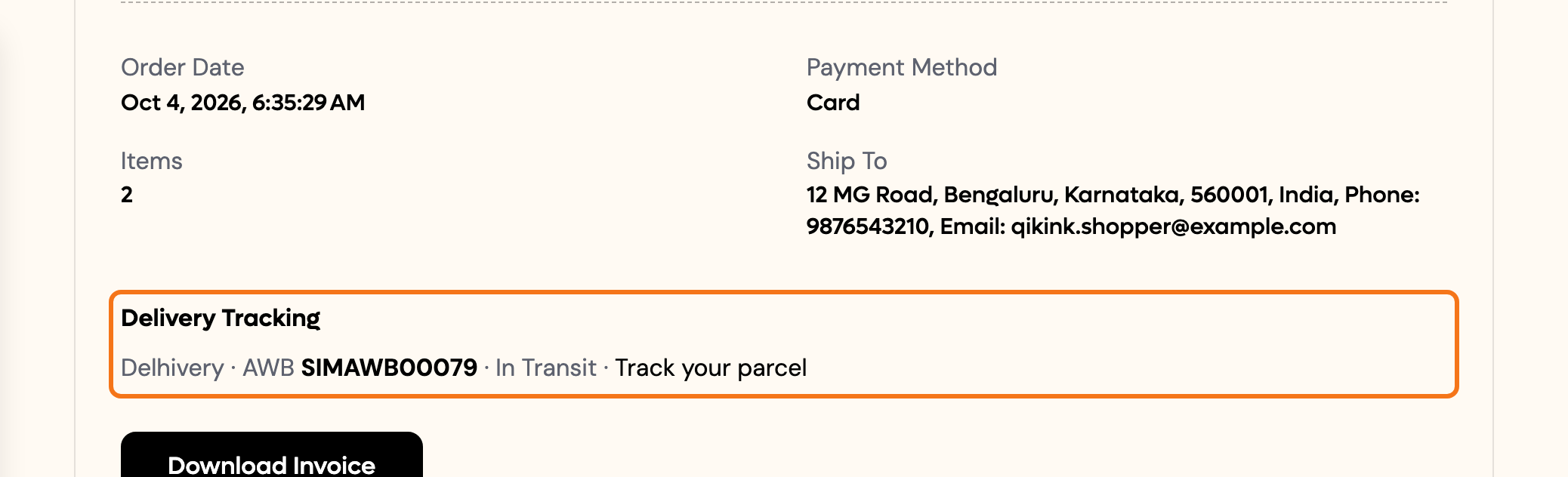
3. Open the order on the storefront as the shopper. **Delivery Tracking** shows the carrier, the AWB and **Track your parcel**.
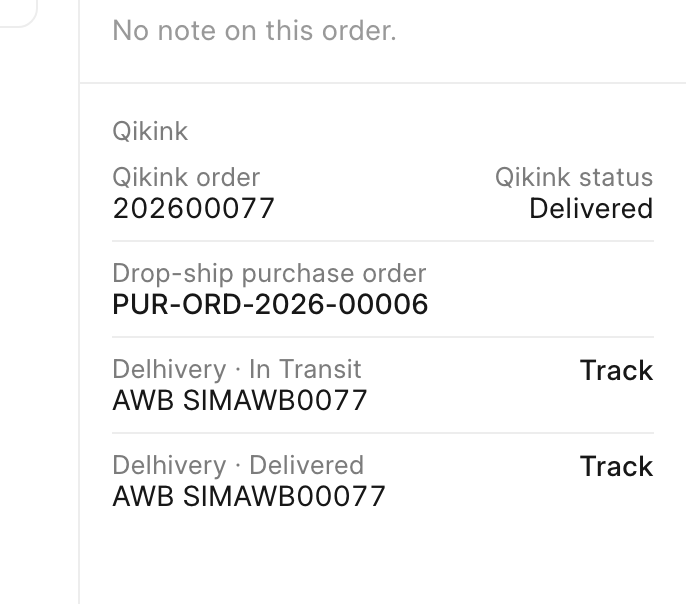 The card lists every shipment of the order. In this shot, the first row is an earlier In Transit test shipment. The row that this step made is the second one, **Delivered**.
 ## Next steps
- [Step 10: Handle cancellations](/commera/build-a-plugin/handle-cancellations)
- [SDK](/commera/plugin-reference/sdk)
- [Events](/commera/plugin-reference/events)
## Next steps
- [Step 10: Handle cancellations](/commera/build-a-plugin/handle-cancellations)
- [SDK](/commera/plugin-reference/sdk)
- [Events](/commera/plugin-reference/events)