---
title: "Step 4: Map products"
space: "Commera"
url: "https://docs.bwh.tech/commera/build-a-plugin/map-products"
updated: "2026-10-09"
---
In this step, you store a Qikink SKU on each product variant. You add a card that shows the mapping on the product page, and a **Set Qikink SKUs** action that edits all variants in one dialog.
Commit: [feat: map products to qikink skus and drop-ship them](https://github.com/Rl0007/commera_qikink/commit/41878ac). Later tidied in [refactor: use frappe utilities across the app](https://github.com/Rl0007/commera_qikink/commit/a8fa754). The code on this page is the tidied version.
## What you'll build
- Two Custom Fields on Item: **Qikink SKU** and **Qikink Plain Product**.
- `commera_qikink/products.py` and two methods in `api.py` that read and save the SKUs.
- `commera/product/cards/qikink/index.vue`, a card on the product page.
- `commera/product/actions/set-qikink-skus/index.vue`, a **Set Qikink SKUs** action.
## How Qikink products map to your items
One Qikink SKU is one model in one color and one size. In Commera, that is one variant Item: the item code on the order line. So the SKU goes on each variant, not on the product.
| Your product | Where the SKU goes |
| --- | --- |
| A T-shirt in Black and White, sizes S to XL | Eight variant Items, one SKU each |
| A product without variants | The product's own Item |
Qikink reads a SKU in one of two ways. The plugin stores a **Plain** tick next to each SKU:
| Plain | The SKU is | Example |
| --- | --- | --- |
| Off | Your own design, from the **My Products** page of your Qikink dashboard | The SKU that Qikink shows for that design |
| On | A blank product from Qikink's catalog, printed with no design | `MVnHs-Bk-S` |
Each mapped variant also becomes a drop-ship item in ERPNext. The plugin ticks **Delivered by Supplier (Drop Ship)** on the Item, and it sets the Qikink supplier as the default supplier for the store's company. Step 5 and step 7 use these two values to find the Qikink lines of a cart or an order.
:::caution[The sandbox has no My Products]
Your sandbox account has its own, empty My Products page. A My Products SKU from your live dashboard returns `Invalid SKU` on the sandbox. Test with Plain catalog SKUs, such as `MVnHs-Bk-S`, `MVnHs-Bk-M` and `MVnHs-Bk-L`.
:::
## 1. Add two Custom Fields to Item
Create `commera_qikink/install.py`:
```python
from frappe.custom.doctype.custom_field.custom_field import create_custom_fields
MODULE = "Qikink"
def add_custom_fields():
create_custom_fields(
{
"Item": [
{
"fieldname": "commera_qikink_sku",
"label": "Qikink SKU",
"fieldtype": "Data",
"insert_after": "delivered_by_supplier",
"module": MODULE,
},
{
"fieldname": "commera_qikink_plain_product",
"label": "Qikink Plain Product",
"fieldtype": "Check",
"insert_after": "commera_qikink_sku",
"depends_on": "commera_qikink_sku",
"module": MODULE,
},
]
},
update=True,
)
```
Run it after install and after every migrate. Add these lines at the end of `commera_qikink/hooks.py`:
```python
after_install = "commera_qikink.install.add_custom_fields"
after_migrate = "commera_qikink.install.add_custom_fields"
```
:::caution[Start every Custom Field with your app name]
Commera counts a Custom Field as your plugin's field only when its name starts with your app name and an underscore. Here that is `commera_qikink_`. After `bench migrate`, Commera writes an Error Log for fields without the prefix, and its SDK refuses to read them. See [Compatibility](/commera/plugin-reference/compatibility).
:::
## 2. Read and save the SKUs
Create `commera_qikink/products.py`. First, add the functions that read the variants of a product and save their SKUs:
```python
import frappe
from frappe import _
from frappe.query_builder import DocType
from frappe.utils.data import cint, cstr
MAX_SKU_LENGTH = 50
ITEM_FIELDS = [
"name as item_code",
"item_name",
"commera_qikink_sku as sku",
"commera_qikink_plain_product as plain_product",
]
def get_product_skus(item_template: str) -> list[dict]:
return get_chain_rows(item_template) or get_variant_rows(item_template) or get_own_rows(item_template)
def save_product_skus(item_template: str, skus: list[dict]) -> list[dict]:
current = {row.item_code for row in get_product_skus(item_template)}
entries = [get_entry(row, current, item_template) for row in skus]
mapped = [entry["item_code"] for entry in entries if entry["sku"]]
supplier = get_qikink_supplier() if mapped else None
for entry in entries:
values = {"commera_qikink_sku": entry["sku"] or None, "commera_qikink_plain_product": entry["plain"]}
if entry["sku"]:
values["delivered_by_supplier"] = 1
frappe.db.set_value("Item", entry["item_code"], values)
if mapped:
set_default_supplier(mapped, supplier)
return get_product_skus(item_template)
def get_chain_rows(item_template: str) -> list[dict]:
color_size_item = DocType("Color Size Item")
variant = DocType("Style Attribute Variant")
configurator = DocType("Style Attribute Configurator")
item = DocType("Item")
return (
frappe.qb.from_(color_size_item)
.join(variant)
.on(variant.name == color_size_item.parent)
.join(configurator)
.on(configurator.name == variant.configurator)
.join(item)
.on(item.name == color_size_item.item_code)
.select(
color_size_item.item_code,
item.item_name,
variant.attribute_value.as_("colour"),
color_size_item.size,
item.commera_qikink_sku.as_("sku"),
item.commera_qikink_plain_product.as_("plain_product"),
)
.where(
(configurator.item_template == item_template)
& (color_size_item.parenttype == "Style Attribute Variant")
)
.orderby(variant.creation)
.orderby(color_size_item.idx)
.run(as_dict=True)
)
def get_variant_rows(item_template: str) -> list[dict]:
return frappe.get_all(
"Item",
filters={"variant_of": item_template, "disabled": 0},
fields=ITEM_FIELDS,
order_by="name asc",
)
def get_own_rows(item_template: str) -> list[dict]:
return frappe.get_all(
"Item",
filters={"name": item_template},
fields=ITEM_FIELDS,
)
```
`get_product_skus` tries three places for the variants, in this order:
1. Commera's own variant tables. A product in Commera is a template Item. Its colors are **Style Attribute Variant** rows, and each color has one **Color Size Item** row for each size, with the variant's item code.
2. ERPNext variants, that is Items whose **Variant Of** is the template.
3. The Item itself, for a product without variants.
Next, add the functions that check a row and set the supplier:
```python
def get_entry(row: dict, current: set, item_template: str) -> dict:
item_code = cstr(row.get("item_code"))
if item_code not in current:
frappe.throw(_("{0} is not an item of product {1}.").format(item_code, item_template))
sku = cstr(row.get("sku")).strip()
if len(sku) > MAX_SKU_LENGTH:
frappe.throw(_("A Qikink SKU has at most {0} characters: {1}").format(MAX_SKU_LENGTH, sku))
return {"item_code": item_code, "sku": sku, "plain": cint(row.get("plain_product")) if sku else 0}
def get_qikink_supplier() -> str:
supplier = frappe.db.get_single_value("Qikink Settings", "supplier")
if not supplier:
frappe.throw(
_(
"Choose the Qikink supplier first, in Settings > Installed plugins > Qikink. "
"Qikink ships these products for you, so each one is bought from that supplier."
)
)
return supplier
def set_default_supplier(item_codes: list[str], supplier: str):
company = get_store_company()
defaults = frappe.get_all(
"Item Default",
filters={"parenttype": "Item", "parent": ["in", item_codes]},
fields=["name", "parent", "company"],
)
row_counts = {}
company_rows = {}
for row in defaults:
row_counts[row.parent] = row_counts.get(row.parent, 0) + 1
if row.company == company:
company_rows[row.parent] = row.name
for item_code in item_codes:
if item_code in company_rows:
frappe.db.set_value("Item Default", company_rows[item_code], "default_supplier", supplier)
continue
frappe.get_doc(
{
"doctype": "Item Default",
"parenttype": "Item",
"parentfield": "item_defaults",
"parent": item_code,
"idx": row_counts.get(item_code, 0) + 1,
"company": company,
"default_supplier": supplier,
}
).db_insert()
def get_store_company() -> str:
# Same fallback Commera uses when it makes a cart.
return frappe.get_cached_doc("Commera Settings").get("company") or frappe.db.get_single_value(
"Global Defaults", "default_company"
)
```
`save_product_skus` refuses an item that is not part of the product, and a SKU longer than 50 characters. It needs the **Supplier** from Qikink Settings before it maps a variant. Clearing a SKU keeps the drop-ship values, so step 5 still refuses that variant in a cart.
:::note[Taking a variant off Qikink]
The dialog never clears **Delivered by Supplier (Drop Ship)**. To sell a variant from your own stock again, clear **Delivered by Supplier (Drop Ship)** on the Item in Desk.
:::
## 3. Add the API methods
Add two whitelisted methods to `commera_qikink/api.py`. Each one checks the Item permission before it calls `products.py`:
```python
from commera_qikink import products
@frappe.whitelist(methods=["GET"])
def get_product_skus(item: str) -> list[dict]:
frappe.has_permission("Item", "read", doc=item, throw=True)
return products.get_product_skus(item)
@frappe.whitelist(methods=["POST"])
def save_product_skus(item: str, skus: str | list) -> list[dict]:
frappe.has_permission("Item", "write", doc=item, throw=True)
return products.save_product_skus(item, frappe.parse_json(skus))
```
Create `commera_qikink/conditions.py`. The action in sub-step 5 shows only to users who can edit the Item:
```python
import frappe
def can_edit_item(doctype: str, name: str) -> bool:
return bool(frappe.has_permission("Item", "write", name))
```
## 4. Add the product card
Create `commera/shared/skus.js` for the labels that the card and the action share:
```js
export const variantLabel = (row) => [row.colour, row.size].filter(Boolean).join(' / ') || row.item_name || row.item_code
export const modeLabel = (row) => (row.plain_product ? 'Plain' : 'My Products')
```
In `apps/commera_qikink`, run `bench commera add product-card qikink`. Replace the `commera/product/cards/qikink/index.vue` it writes with this:
```vue
{{ mappedCount }} of {{ rows.length }} mapped to a Qikink SKU
{{ variantLabel(row) }}
{{ row.sku }}
{{ modeLabel(row) }}
Not mapped
```
`usePlugin()` gives the card the record of the page. On a product page, `record.value.name` is the template Item. Commera draws the card frame and its **Qikink** title from `label`.
## 5. Add the Set Qikink SKUs action
In `apps/commera_qikink`, run `bench commera add product-action set-qikink-skus`. Replace the `commera/product/actions/set-qikink-skus/index.vue` it writes with this, and delete the `set_qikink_skus_product` stub it adds to `api.py`:
```vue
Enter the SKU from Qikink's My Products page, or tick Plain for a blank catalog product printed with no
design. Mapped sizes are drop-shipped by your Qikink supplier.
```
Commera draws the dialog and its buttons. `useAction()` sets the primary button and runs `onSubmit` when the user clicks it. When `onSubmit` returns `{ reload: true }`, Commera reloads the page, and the card shows the new mapping.
## 6. Migrate and set up the supplier
1. Run `bench --site your.site migrate`. It makes the two Custom Fields on Item.
2. Build the plugin with `bench build --app commera_qikink`.
3. In Desk, create a Supplier named `Qikink`.
4. Open **Settings > Installed plugins > Qikink** in `/commera`.
5. Set **Supplier** to `Qikink`.
## Check it works
1. In `/commera`, open **Products** and open a product with variants.
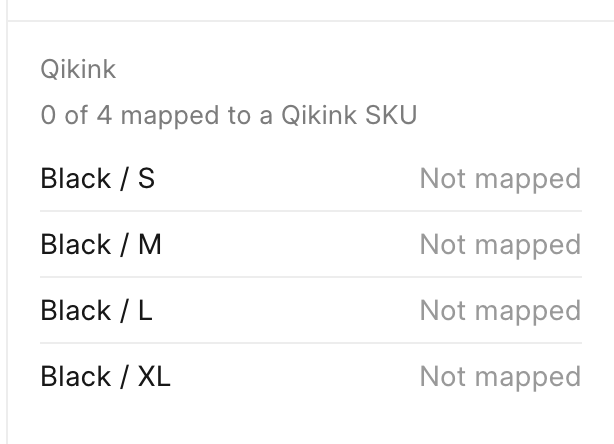
2. Find the **Qikink** card. It shows the count of mapped variants, for example "0 of 4 mapped to a Qikink SKU", with "Not mapped" next to each variant.
 3. Click the **More actions** button (the three dots next to **Save**), then click **Set Qikink SKUs**.
4. Type a catalog SKU for S, M and L, for example `MVnHs-Bk-S`, and tick **Plain** for each one. Leave XL empty.
3. Click the **More actions** button (the three dots next to **Save**), then click **Set Qikink SKUs**.
4. Type a catalog SKU for S, M and L, for example `MVnHs-Bk-S`, and tick **Plain** for each one. Leave XL empty.
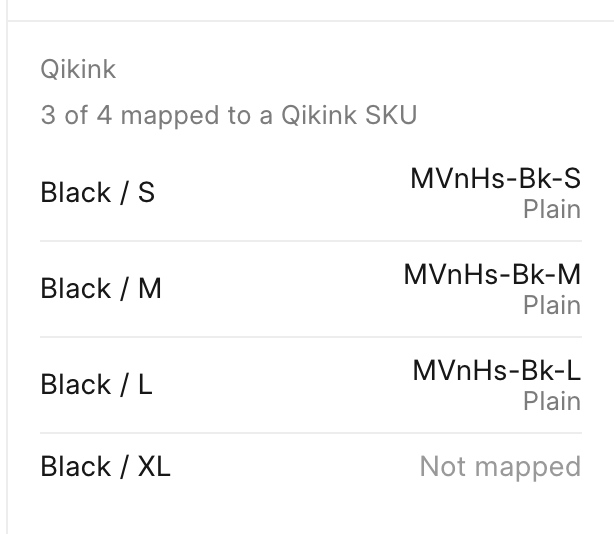
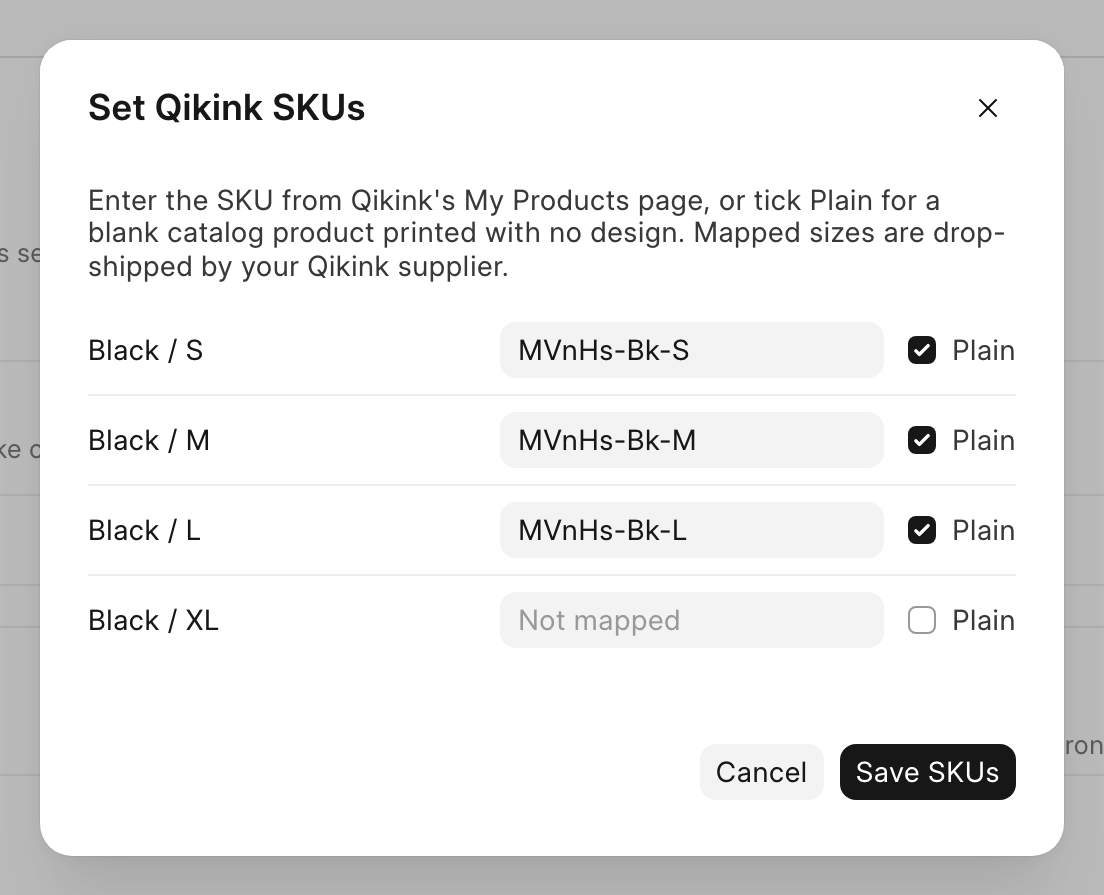 5. Click **Save SKUs**. A toast shows "Qikink SKUs saved", and the card shows the SKUs, each marked "Plain".
 6. In Desk, open one of the mapped variant Items. **Delivered by Supplier (Drop Ship)** is ticked, and the **Item Defaults** row for your company has **Default Supplier** set to `Qikink`.
## Next steps
- [Step 5: Block unmapped carts](/commera/build-a-plugin/block-unmapped-carts)
- [Dashboard entries](/commera/plugin-reference/dashboard-entries): cards, actions, `usePlugin` and `useAction`
- [SDK](/commera/plugin-reference/sdk): the Commera functions a plugin can call
6. In Desk, open one of the mapped variant Items. **Delivered by Supplier (Drop Ship)** is ticked, and the **Item Defaults** row for your company has **Default Supplier** set to `Qikink`.
## Next steps
- [Step 5: Block unmapped carts](/commera/build-a-plugin/block-unmapped-carts)
- [Dashboard entries](/commera/plugin-reference/dashboard-entries): cards, actions, `usePlugin` and `useAction`
- [SDK](/commera/plugin-reference/sdk): the Commera functions a plugin can call