---
title: "Automatic discounts"
space: "Commera"
url: "https://docs.bwh.tech/commera/discounts/automatic-discounts"
updated: "2026-11-03"
---
Give money off without a code. The discount applies by itself when the cart meets its rules.
Meera wants bigger baskets during Diwali. Shoppers who spend more should save more, and anyone who buys two teas should get a pack of herbal tea bags free.
## Before you start
Read [Discounts overview](/commera/discounts/discounts-overview).
## Steps
### Spend more, save more
1. Go to **Discounts** and click **Create discount**. Pick **Amount off order**.
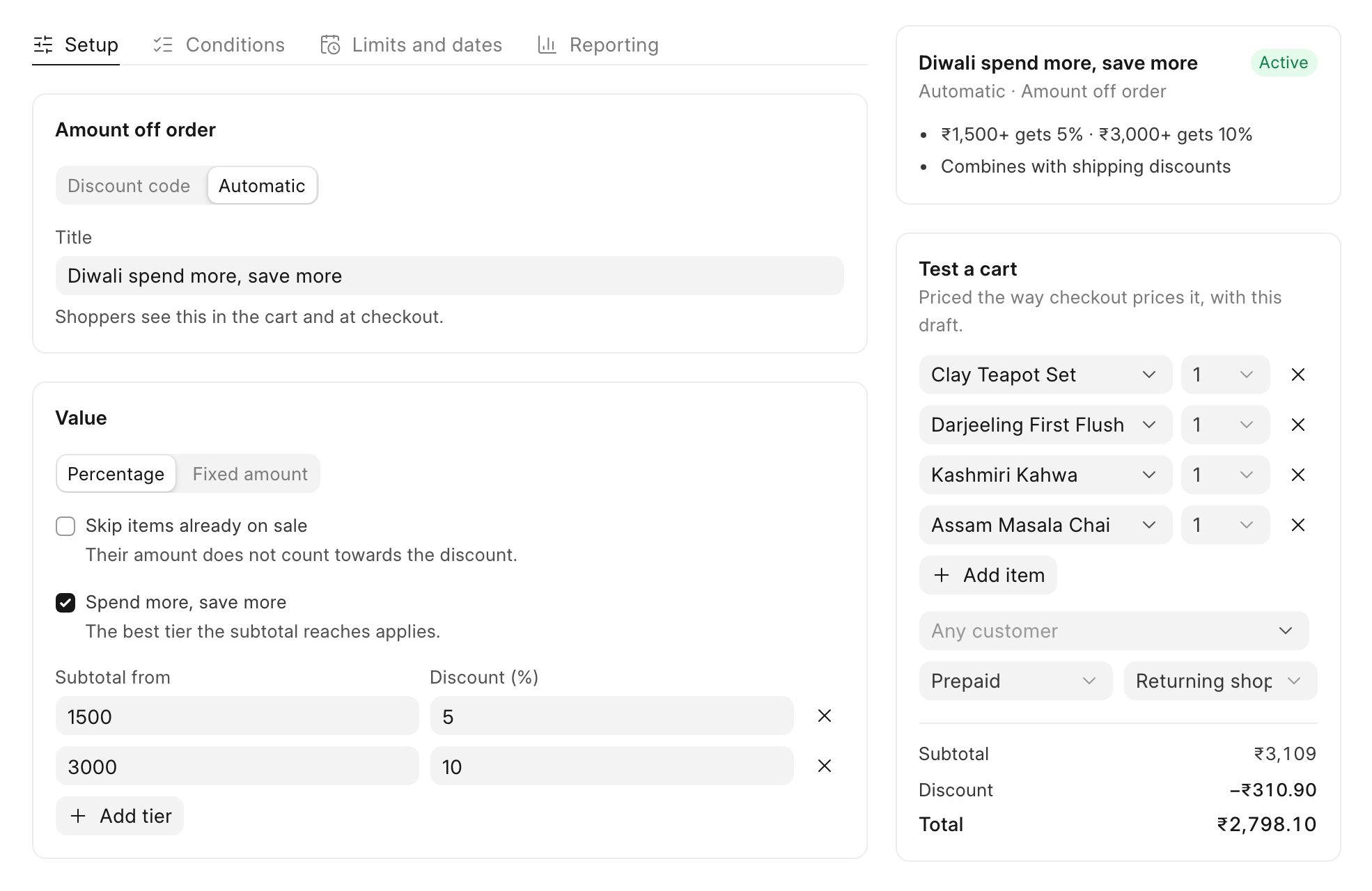
2. On the **Setup** tab, click **Automatic**. In **Title**, type the name shoppers will see, such as "Diwali spend more, save more".
3. Under **Value**, keep **Percentage** and tick **Spend more, save more**. Click **Add tier** to add a row.
4. Fill in each tier. In **Subtotal from**, type the spend. In **Discount (%)**, type the percentage. Meera adds two tiers: 5% from ₹1,500 and 10% from ₹3,000.
"The best tier the subtotal reaches applies." A ₹3,109 cart gets 10%, not 5% plus 10%.
 5. Click **Save**.
### Buy X get Y
1. Click **Create discount** and pick **Buy X get Y**.
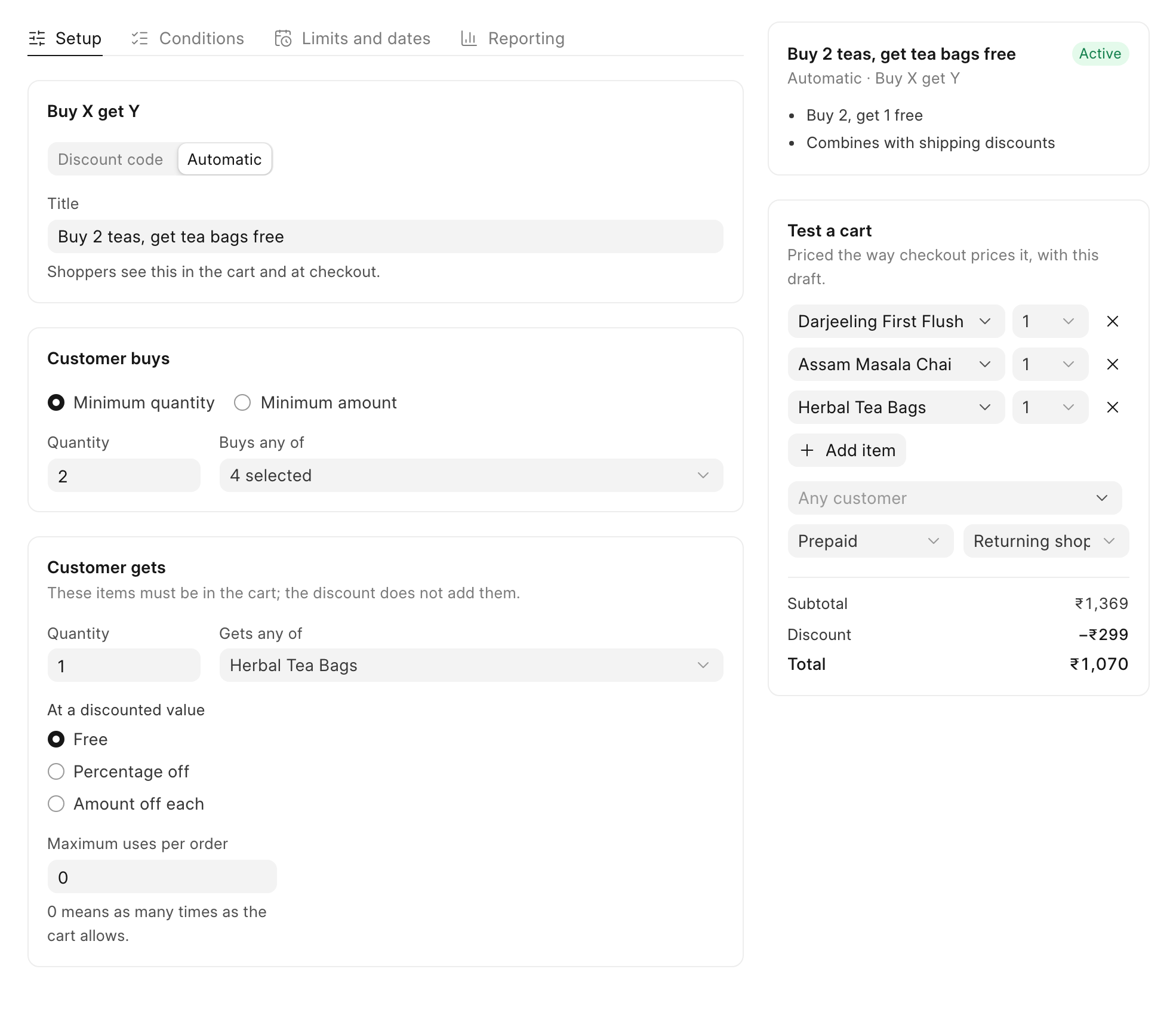
2. Click **Automatic** and type a **Title**, such as "Buy 2 teas, get tea bags free".
3. Under **Customer buys**, keep **Minimum quantity** and set **Quantity** to 2. In **Buys any of**, click "Search products" and tick each product that counts. Meera ticks her four loose teas.
4. Under **Customer gets**, set **Quantity** to 1. In **Gets any of**, tick the free product, "Herbal Tea Bags".
5. Under **At a discounted value**, keep **Free**. You can also choose **Percentage off** or **Amount off each**.
6. In **Maximum uses per order**, keep 0 to give the reward as many times as the cart allows. Type 1 to give it once per order.
 7. Click **Save**.
:::caution[The free item must be in the cart]
"These items must be in the cart; the discount does not add them." Tell shoppers about the offer on your banner or product page, so they add the tea bags themselves.
:::
## Check it worked
Both discounts show **Automatic** in the **Method** column of the **Discounts** list.
As a shopper, add two teas and the herbal tea bags to the cart. The **Order summary** shows "Discount (Buy 2 teas, get tea bags free)" and the price of the tea bags comes off. No code is needed.
## Good to know
:::note[Amount off products]
To take money off some products only, pick **Amount off products**. Under **Applies to**, choose **All products**, **Specific products**, **Specific collections** (sub-collections are included) or **Specific brands**. Use **Exclude products** to leave some out.
:::
:::note[Which discounts apply together]
When a cart qualifies for more than one discount, they stack only if each one allows the other. See [Limits and rules](/commera/discounts/limits-and-rules).
:::
## Next
[Free shipping](/commera/discounts/free-shipping)