---
title: "Before you launch"
space: "Commera"
url: "https://docs.bwh.tech/commera/set-up-your-store/before-launch"
updated: "2026-09-21"
---
Work through this checklist before you share your store with the world.
## Store details
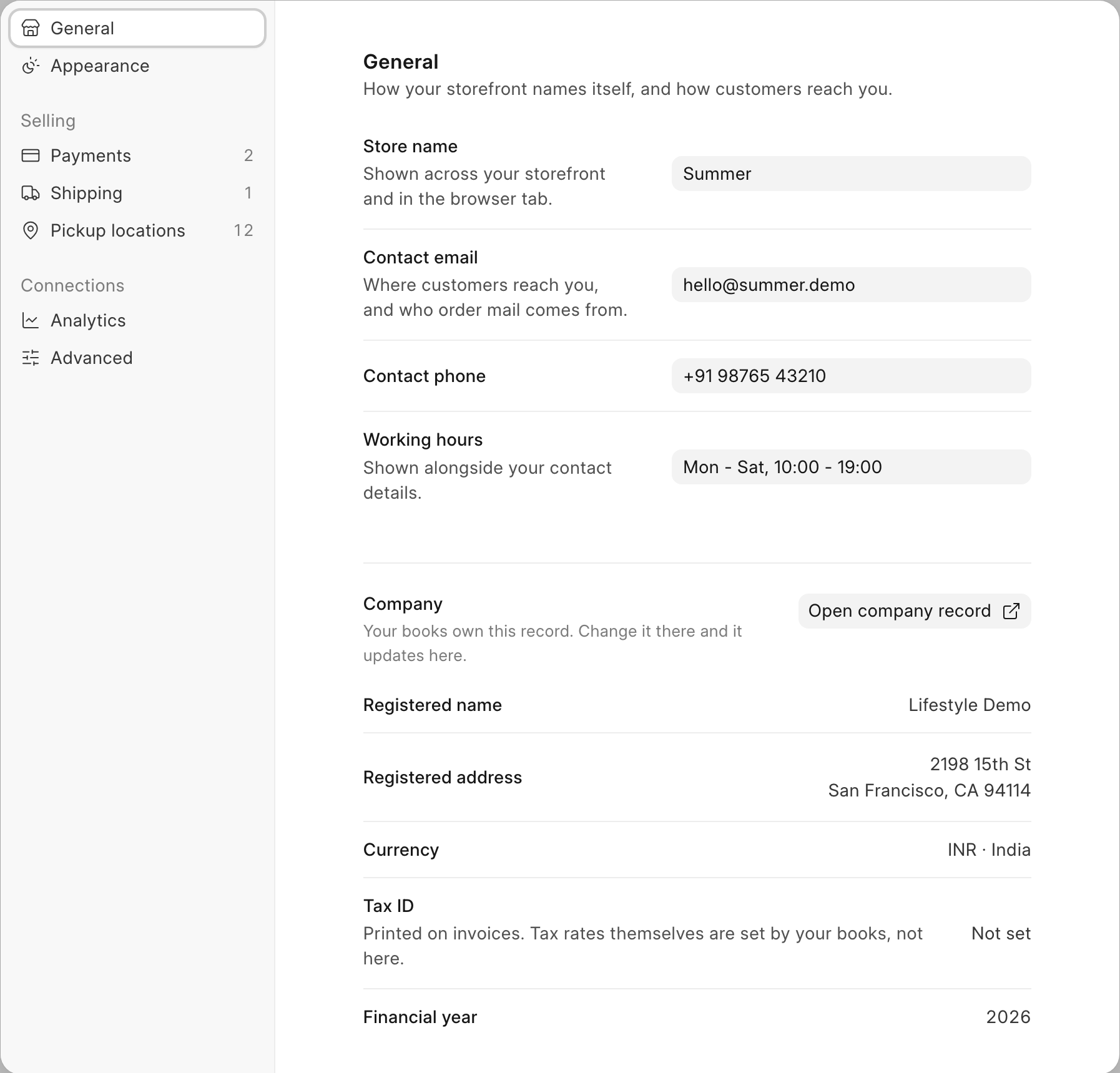
- [ ] **Store name** is set: shown across your storefront and in the browser tab.
- [ ] **Contact email** is set: where customers reach you, and who order mail comes from.
- [ ] **Contact phone** is set.
- [ ] **Working hours** are set. Shown alongside your contact details.
All four are on the **General** tab of **Settings** (account menu > **Settings**).
 :::note[Ask your administrator]
**Registered name**, **Registered address** and **Tax ID** are read-only here. Your books own these records: change them there and they update here. If the panel says "No company is set for this store yet", ask your administrator to set one.
:::
## Pages shoppers expect
- [ ] Add an **About us** page.
- [ ] Add a **Shipping** page.
- [ ] Add a **Returns** page.
- [ ] Add a **Privacy policy** page.
- [ ] Add a **Terms** page.
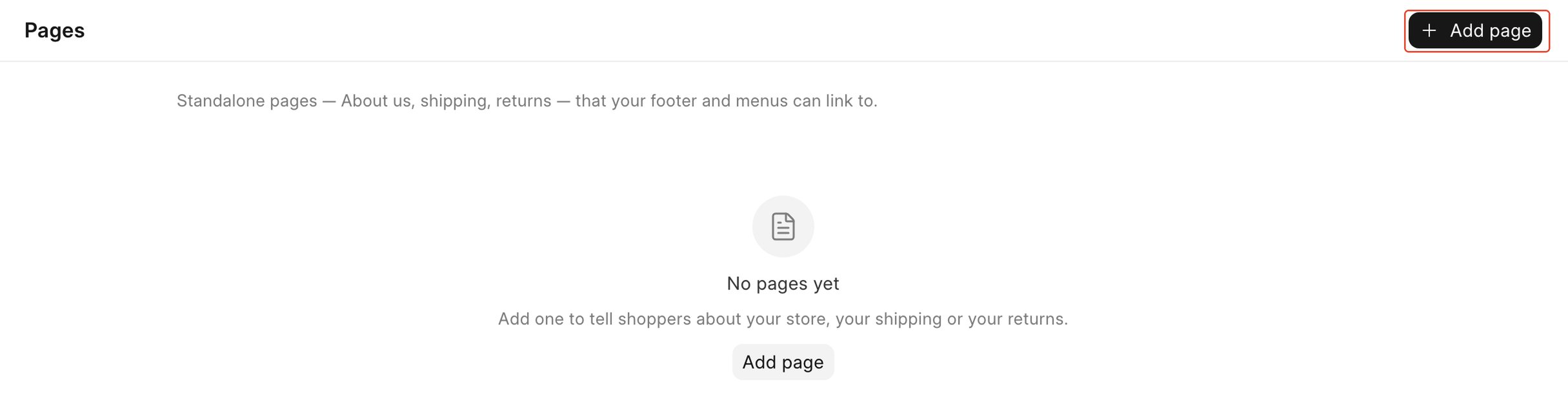
Your storefront footer already links to **Privacy Policy**, **Returns** and **Terms & Conditions**. Go to **Storefront** > **Pages** and click **Add page** for each one, or they will lead nowhere once a shopper clicks them.
:::note[Ask your administrator]
**Registered name**, **Registered address** and **Tax ID** are read-only here. Your books own these records: change them there and they update here. If the panel says "No company is set for this store yet", ask your administrator to set one.
:::
## Pages shoppers expect
- [ ] Add an **About us** page.
- [ ] Add a **Shipping** page.
- [ ] Add a **Returns** page.
- [ ] Add a **Privacy policy** page.
- [ ] Add a **Terms** page.
Your storefront footer already links to **Privacy Policy**, **Returns** and **Terms & Conditions**. Go to **Storefront** > **Pages** and click **Add page** for each one, or they will lead nowhere once a shopper clicks them.
 ## Products
- [ ] Every product you want to sell has a photo.
- [ ] Every product you want to sell is published.
- [ ] Every product you want to sell has stock. On the product page, open the row's **⋯** menu in **Variants** and choose **Receive stock**.
See [Add your first product](/commera/set-up-your-store/first-product) if you still need to create one.
## Payments and shipping
- [ ] At least one way to pay is turned on.
- [ ] At least one delivery option is turned on.
See [Connect a payment gateway](/commera/set-up-your-store/payments) and [Set up shipping](/commera/set-up-your-store/shipping).
## Test
- [ ] You placed a test order and cancelled it.
See [Place a test order](/commera/set-up-your-store/test-order).
## Domain
- [ ] Your store is on your own domain.
Putting your store on your own domain is a hosting task. Ask your administrator.
## What's next
Once every box above is ticked, your store is ready to share. The rest of this guide goes deeper on products, orders, the storefront and settings, one area at a time.
## Products
- [ ] Every product you want to sell has a photo.
- [ ] Every product you want to sell is published.
- [ ] Every product you want to sell has stock. On the product page, open the row's **⋯** menu in **Variants** and choose **Receive stock**.
See [Add your first product](/commera/set-up-your-store/first-product) if you still need to create one.
## Payments and shipping
- [ ] At least one way to pay is turned on.
- [ ] At least one delivery option is turned on.
See [Connect a payment gateway](/commera/set-up-your-store/payments) and [Set up shipping](/commera/set-up-your-store/shipping).
## Test
- [ ] You placed a test order and cancelled it.
See [Place a test order](/commera/set-up-your-store/test-order).
## Domain
- [ ] Your store is on your own domain.
Putting your store on your own domain is a hosting task. Ask your administrator.
## What's next
Once every box above is ticked, your store is ready to share. The rest of this guide goes deeper on products, orders, the storefront and settings, one area at a time.