.webp)



Commera is your online store and the dashboard you use to run it. From one place you add products, take orders, connect the way you get paid, and see how the store is doing. This guide walks you through setting it up, one piece at a time.
Open the dashboard
Go to /commera/ on your store's domain and sign in. You land on Overview, the page with your store's headline numbers.
Find your way around
The sidebar is split into three groups.
- The top group has no heading: Overview, Search, Orders, Customers, Analytics.
- Catalog: Products, Collections, Attributes.
- Storefront: Theme, Navigation, Pages, Reviews.
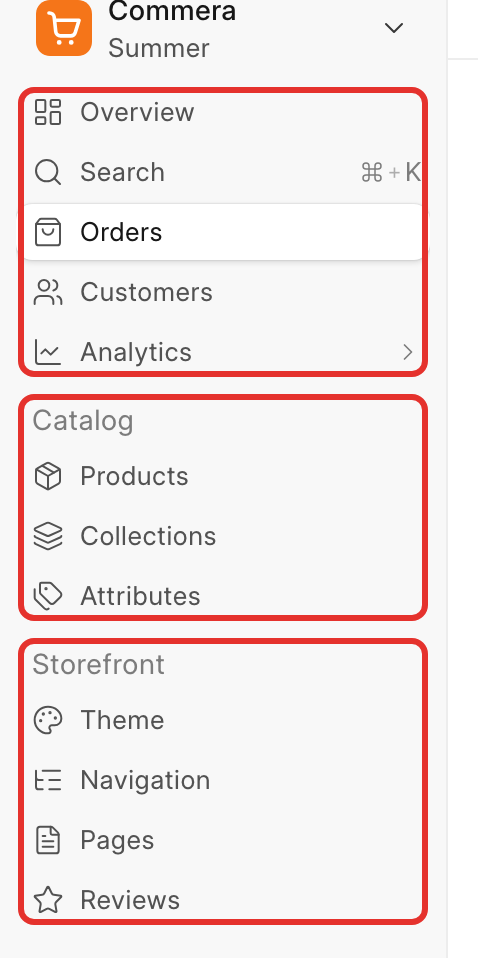
At the top of the sidebar is a switcher showing your store name and theme name, for example "Commera" / "Summer". Click it to open the account menu: Settings, Appearance, View storefront, Log out.
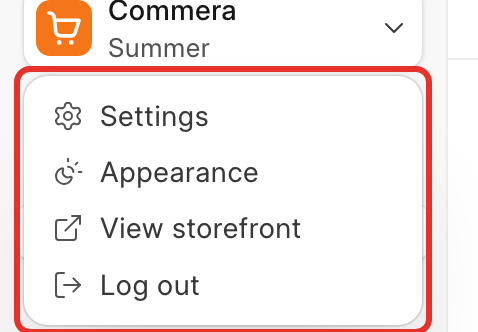
Use View storefront any time you want to see the store the way a shopper does, and Settings for details like your store name, contact information and currency.
What's in this section
Set up your store in this order:
- Add your first product: create one sellable product with a price, sizes and a photo.
- Connect a payment gateway: turn on an online gateway or cash on delivery so you can get paid.
- Set up shipping: connect a carrier and choose the delivery options shoppers see.
- Pick a theme: choose a theme and adjust its settings.
- Place a test order: buy your own product end to end and see it land in Orders.
- Before you launch: a short checklist to run through before you share the store.
Next: Add your first product.