.webp)



Step 11: Add a Qikink orders page
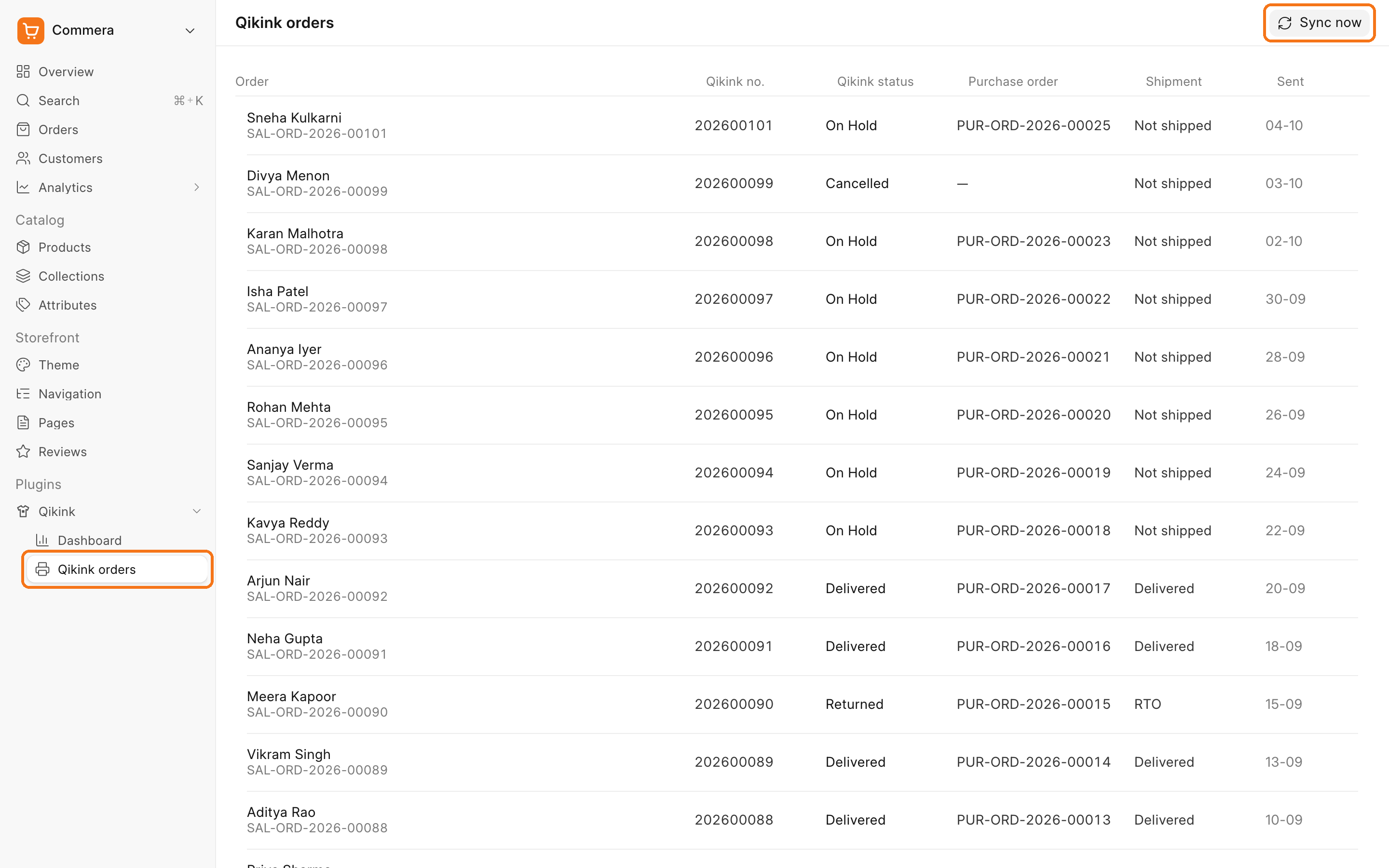
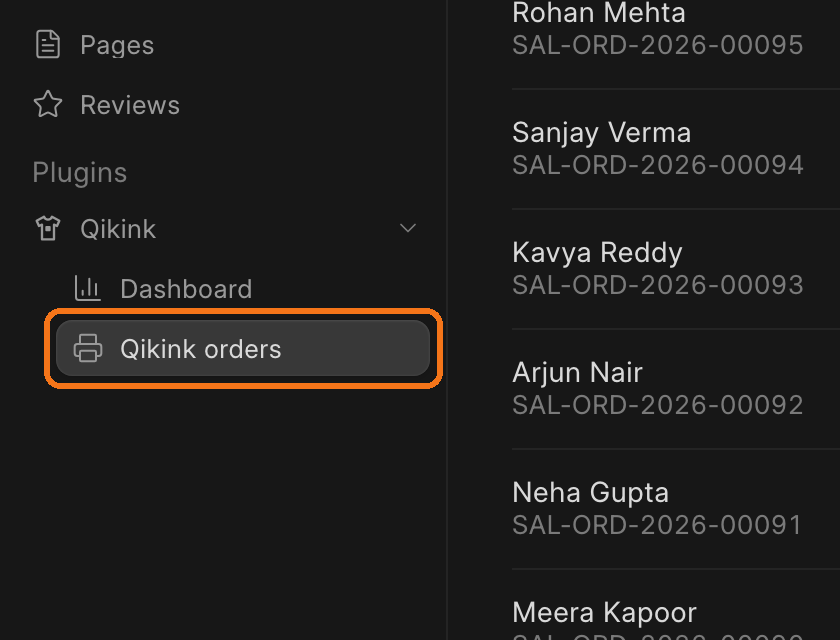
In this step, you give your plugin its own page in /commera. The page lists every order sent to Qikink, with its Qikink status, Purchase Order and shipment. A Sync now button runs the status sync on demand. The page gets a sidebar row with your plugin's icon.
Code for this step: feat: list qikink orders on their own page with a sync action
What you'll build
commera/pages/orders/index.vue, served at/commera/plugins/commera_qikink/orders.commera/plugin-icon.svg, the plugin's logo.- Two whitelisted methods:
get_sent_ordersandsync_open_orders.
1. Remove the starter page
bench commera init wrote a starter page that calls get_summary. Delete the starter page folder under commera/pages/ and the get_summary method in api.py.
2. Read the sent orders
Create commera_qikink/order_list.py. One query reads a page of sent orders, their Purchase Order and the total count. The Shipping Request join runs only when bwh_shipping is installed.
import frappe
from frappe.query_builder import functions
from frappe.utils.data import cint
from pypika import analytics

MAX_PAGE_LENGTH = 100


def get_sent_orders(start: int = 0, page_length: int = 20) -> dict:
	sales_order = frappe.qb.DocType("Sales Order")
	purchase_order_item = frappe.qb.DocType("Purchase Order Item")
	query = (
		frappe.qb.from_(sales_order)
		.left_join(purchase_order_item)
		.on((purchase_order_item.sales_order == sales_order.name) & (purchase_order_item.docstatus == 1))
		.select(
			sales_order.name,
			sales_order.customer_name,
			sales_order.commera_qikink_order_number.as_("order_number"),
			sales_order.commera_qikink_status.as_("status"),
			functions.Max(purchase_order_item.parent).as_("purchase_order"),
			sales_order.commera_qikink_sent_at.as_("sent_on"),
			analytics.Count("*").over().as_("total"),
		)
		.where((sales_order.docstatus == 1) & (sales_order.commera_qikink_order_number.isnotnull()))
		.where(sales_order.commera_qikink_order_number != "")
		.groupby(sales_order.name)
		.orderby(sales_order.creation, order=frappe.qb.desc)
		.limit(min(cint(page_length) or 20, MAX_PAGE_LENGTH))
		.offset(cint(start))
	)
	if "bwh_shipping" in frappe.get_installed_apps():
		shipping_request = frappe.qb.DocType("Shipping Request")
		query = (
			query.left_join(shipping_request)
			.on(
				(shipping_request.ref_doctype == "Sales Order")
				& (shipping_request.ref_docname == sales_order.name)
				& (shipping_request.docstatus < 2)
			)
			.select(functions.Max(shipping_request.status).as_("shipment_status"))
		)

	rows = query.run(as_dict=True)
	total = rows[0].total if rows else 0
	for row in rows:
		row.pop("total")
	return {"rows": rows, "total": total}
3. Add the methods
Make sync_open_orders in order_status.py return the orders it synced:
def sync_open_orders() -> list[str]:
	if open_orders := get_open_orders():
		return sync_orders(open_orders, isolate_errors=True)
	return []
In api.py:
@frappe.whitelist(methods=["GET"])
def get_sent_orders(start: int = 0, page_length: int = 20) -> dict:
	frappe.has_permission("Sales Order", "read", throw=True)
	return order_list.get_sent_orders(start, page_length)


@frappe.whitelist(methods=["POST"])
def sync_open_orders() -> str:
	frappe.has_permission("Sales Order", "write", throw=True)
	return _("Updated {0} orders from Qikink").format(len(order_status.sync_open_orders()))
useMethodRead sends a GET request, and Frappe does not commit a GET request. Keep writes in POST methods.
4. Build the page
In apps/commera_qikink, run bench commera add page orders. Replace the commera/pages/orders/index.vue it writes with this. The plugin block names the sidebar row. order: 1 puts it first among your plugin's pages.
<script>
export const plugin = { label: 'Qikink orders', icon: 'printer', order: 1 };
</script>

<script setup>
import { computed, ref } from 'vue';
import { List, ListCell, ListHeader, ListHeaderCell, ListRow, ListRows } from 'frappe-ui/list';
import {
	EmptyState,
	ListPagination,
	ListSkeleton,
	shortDate,
	usePlugin,
	useMethodAction,
	useMethodRead,
	usePage,
} from '@commera/admin';

const { navigate, toast } = usePlugin();
const page = ref(1);
const pageSize = ref(20);

const ordersRequest = useMethodRead('commera_qikink.api.get_sent_orders', {
	params: () => ({ start: (page.value - 1) * pageSize.value, page_length: pageSize.value }),
	refetch: true,
});
const syncRequest = useMethodAction('commera_qikink.api.sync_open_orders');

async function syncNow() {
	await syncRequest.submit();
	if (syncRequest.error) return;
	toast.success(syncRequest.data);
	ordersRequest.reload();
}

const pageHeader = usePage();
pageHeader.setTitle('Qikink orders');
pageHeader.setActions([
	{ label: 'Sync now', icon: 'refresh-cw', loading: () => syncRequest.loading, onClick: syncNow },
]);

const rows = computed(() => ordersRequest.data?.rows ?? []);
const total = computed(() => ordersRequest.data?.total ?? 0);
</script>
The template uses frappe-ui's List with six columns: Order, Qikink no., Qikink status, Purchase order, Shipment and Sent. A row click opens the order with navigate(/orders/${item.name}). Show ListSkeleton while the first page loads, ListPagination under the list, and an EmptyState when nothing is sent yet. The commit has the full template.
<EmptyState
	v-if="!ordersRequest.loading && !rows.length"
	icon="lucide-printer"
	title="No orders sent to Qikink yet"
	description="Paid store orders go to Qikink on their own. Send a cash on delivery order from its More actions menu."
/>
5. Add the icon
Replace the placeholder in commera/plugin-icon.svg:
<svg xmlns="http://www.w3.org/2000/svg" viewBox="0 0 24 24" fill="none" stroke="#F97316" stroke-width="1.75" stroke-linejoin="round" stroke-linecap="round"><path d="M9 3.5 3.5 6.5l1.75 4 2.25-1V20.5h9V9.5l2.25 1 1.75-4L15 3.5c-.5 1.4-1.6 2.25-3 2.25S9.5 4.9 9 3.5Z"/><rect x="10" y="10.5" width="4" height="4" rx=".75" fill="#F97316" stroke="none"/></svg>
Follow these rules for the icon:
- Draw it on a 24 × 24 viewBox.
- Use real colors that read on a light and a dark sidebar. Commera shows the file as it is. A
currentColordraws black. - Keep it a plain SVG under 20 kB, with no
<script>and noon*attributes. The build refuses anything else.
This logo is the default for every entry your plugin adds, such as its settings tab. An entry with its own icon, like this page's printer, shows that one instead. While orders is your plugin's only page, its sidebar row shows printer too. Add a second page and the row shows the logo.
Check it works
- Run
bench build --app commera_qikink. - Reload
/commera. The sidebar shows a Qikink orders row with your icon. - Click it. The list shows each sent order, for example
SAL-ORD-2026-00077,SAL-ORD-2026-00075andSAL-ORD-2026-00080. Sent shows the order's Sent to Qikink At time, or a dash when that field is empty. - Click Sync now. The toast shows "Updated … orders from Qikink".
- Switch to dark mode. The icon and the list stay readable.