.webp)



Step 7: Create drop-ship orders
In this step, your plugin records what the store buys from Qikink. After Qikink accepts an order, your plugin makes and submits a drop-ship Purchase Order for the Qikink lines. Your books then show the cost of each printed item.
Code for this step: feat: buy qikink lines with a drop-ship purchase order. Later tidied in refactor: use frappe utilities across the app. The code on this page is the tidied version.
What you'll build
- A
before_validatehook that marks Qikink lines as drop-ship on each new Sales Order. - A
make_drop_ship_orderfunction that buys the Qikink lines from Qikink. - A change to
send_orderso that a second call retries a Purchase Order that failed. - A clear error for a Qikink reply that is not JSON.
1. Mark the Qikink lines as drop-ship
Commera copies cart lines to the Sales Order with Delivered by Supplier unticked. The field cannot change after submit, so set it before validation. This hook went in with feat: send paid orders to qikink once.
def set_drop_ship_lines(doc, method=None):
	if doc.docstatus != 0:
		return
	qikink_items = get_qikink_items([row.item_code for row in doc.items])
	supplier = frappe.db.get_single_value("Qikink Settings", "supplier")
	for row in doc.items:
		if row.item_code in qikink_items:
			row.delivered_by_supplier = 1
			row.supplier = supplier
Register it in hooks.py:
doc_events = {"Sales Order": {"before_validate": "commera_qikink.orders.set_drop_ship_lines"}}
2. Make the Purchase Order
Create commera_qikink/purchase_orders.py. ERPNext moved make_purchase_order in a recent version, so import it from either place.
import frappe
from commera.sdk import as_plugin_user
from frappe import _
from frappe.utils import today

try:
	from erpnext.selling.doctype.sales_order.mapper import make_purchase_order
except ImportError:
	from erpnext.selling.doctype.sales_order.sales_order import make_purchase_order


def make_drop_ship_order(order) -> str | None:
	frappe.db.get_value("Sales Order", order.name, "name", for_update=True)
	settings = frappe.get_cached_doc("Qikink Settings")
	lines = get_unordered_lines(order, settings.supplier)
	if not lines:
		return None

	rates = get_buying_rates([row.item_code for row in lines], settings.buying_price_list)
	if missing := sorted({row.item_code for row in lines if row.item_code not in rates}):
		frappe.log_error(
			title=_("Qikink purchase order not made for {0}").format(order.name),
			message=_("No buying price on price list {0} for {1}. Add it, then send the order again.").format(
				settings.buying_price_list or _("(not set in Qikink Settings)"), ", ".join(missing)
			),
			reference_doctype="Sales Order",
			reference_name=order.name,
		)
		return None

	with as_plugin_user("commera_qikink"):
		selected_items = [{"item_code": row.item_code, "supplier": settings.supplier} for row in lines]
		target = frappe.new_doc("Purchase Order", schedule_date=order.delivery_date or today())
		purchase_order = make_purchase_order(order.name, selected_items, target)[0]
		purchase_order.buying_price_list = settings.buying_price_list
		for item in purchase_order.items:
			item.price_list_rate = item.rate = rates[item.item_code]
		purchase_order.save()
		purchase_order.submit()
	return purchase_order.name
as_plugin_user runs the block as Commera's plugin user. The staff member who clicks Send to Qikink can sell, but may not have permission to buy.
3. Skip lines that are already bought
get_unordered_lines returns the drop-ship lines for Qikink that no Purchase Order holds yet. This makes make_drop_ship_order safe to call again.
def get_unordered_lines(order, supplier: str) -> list:
	lines = [
		row for row in order.items if supplier and row.delivered_by_supplier and row.supplier == supplier
	]
	if not lines:
		return []
	ordered = set(
		frappe.get_all(
			"Purchase Order Item",
			filters={"sales_order_item": ["in", [row.name for row in lines]], "docstatus": ["<", 2]},
			pluck="sales_order_item",
		)
	)
	return [row for row in lines if row.name not in ordered]


def get_buying_rates(item_codes: list[str], price_list: str | None) -> dict:
	if not price_list:
		return {}
	prices = frappe.get_all(
		"Item Price",
		filters={"price_list": price_list, "item_code": ["in", item_codes]},
		fields=["item_code", "price_list_rate"],
	)
	return {price.item_code: price.price_list_rate for price in prices}
4. Call it from send_order
Make the Purchase Order after Qikink accepts the order. If the Purchase Order fails, log it and keep the Qikink order. In orders.py:
from commera_qikink.purchase_orders import make_drop_ship_order


def send_order(sales_order: str) -> str | None:
	order = frappe.get_doc("Sales Order", sales_order, for_update=True)
	if order.docstatus != 1:
		frappe.throw(_("Submit order {0} before sending it to Qikink.").format(sales_order))
	if not order.commera_qikink_order_number:
		lines = get_qikink_lines(order)
		if not lines:
			return None
		submit_to_qikink(order, lines)

	save_drop_ship_order(order)
	return order.commera_qikink_order_number


PURCHASE_ORDER_SAVEPOINT = "commera_qikink_purchase_order"


def save_drop_ship_order(order):
	frappe.db.savepoint(PURCHASE_ORDER_SAVEPOINT)
	try:
		make_drop_ship_order(order)
	except Exception:
		# Qikink already holds the order, so a failed purchase order is logged, never allowed to undo it.
		frappe.db.rollback(save_point=PURCHASE_ORDER_SAVEPOINT)
		frappe.log_error(
			title=_("Qikink purchase order failed for {0}").format(order.name),
			reference_doctype="Sales Order",
			reference_name=order.name,
		)
The savepoint rolls back only the Purchase Order work. A bare frappe.db.rollback() would also undo anything that the caller wrote in the same transaction.
submit_to_qikink commits after Qikink accepts the order, which releases the row lock. That is why make_drop_ship_order locks the Sales Order again.
5. Name the unreadable reply
In Send paid orders, you saw that Qikink can accept an order and reply with a body that is not JSON. Catch that case in get_reply in client.py, before the requests.RequestException branch. Otherwise the Error Log reads "Could not reach Qikink" for an order that Qikink may have.
	except requests.JSONDecodeError as error:
		frappe.throw(_("Qikink sent a reply that could not be read: {0}").format(error), QikinkError)
Check it works
- In Qikink Settings, make sure that Supplier and Buying Price List are set.
- Add an Item Price on that price list for each mapped T-shirt variant.
- Buy a mapped T-shirt on the storefront with a test card.
- Open the Sales Order in Desk. Click Connections. A submitted Purchase Order to Qikink is listed.
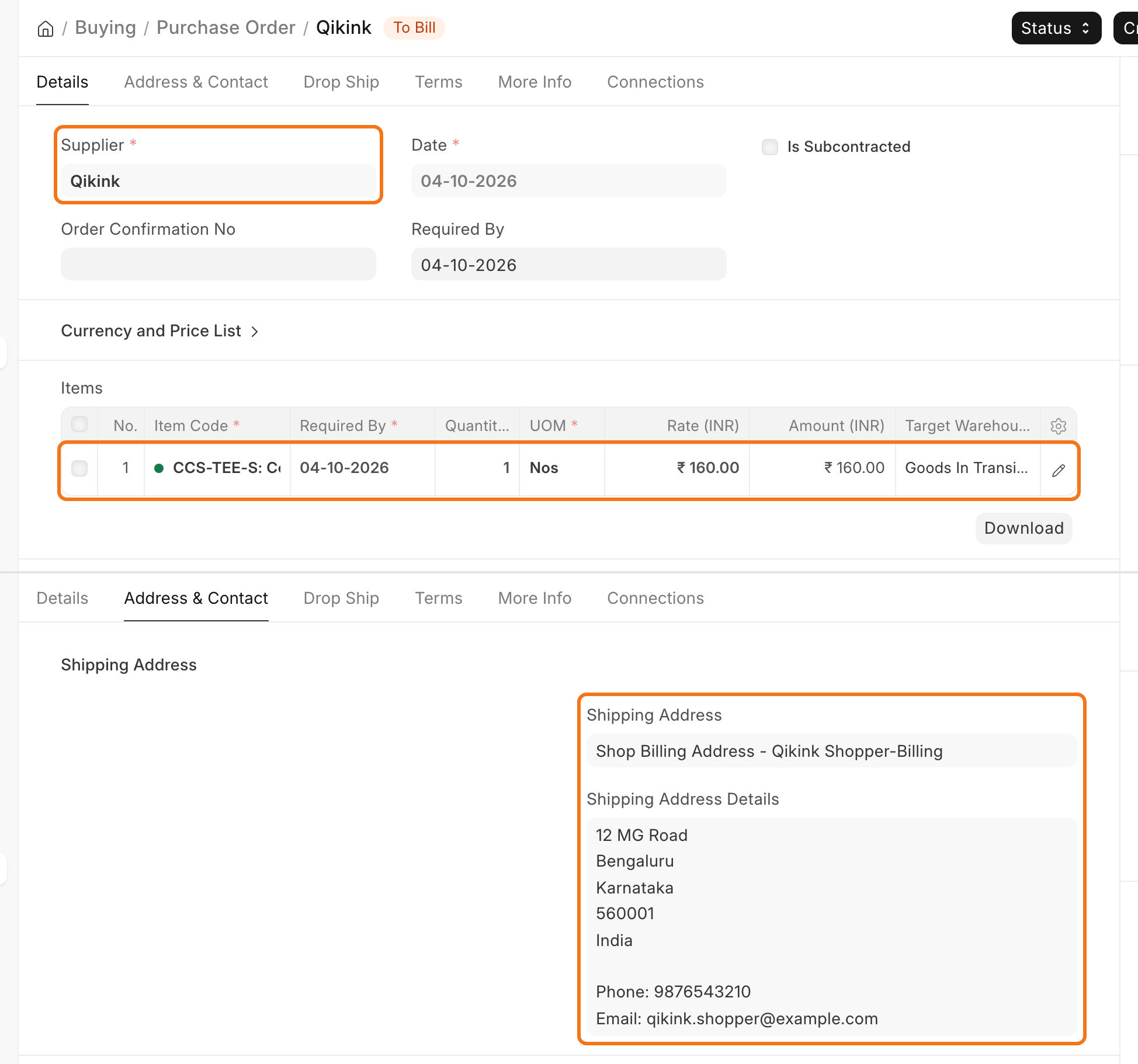
- Open the Purchase Order. It holds only the Qikink lines, at the buying price. The Drop Ship tab shows the shopper as Customer, and the Address & Contact tab shows the shopper's address as Shipping Address.