.webp)



Step 8: Add an order card and actions
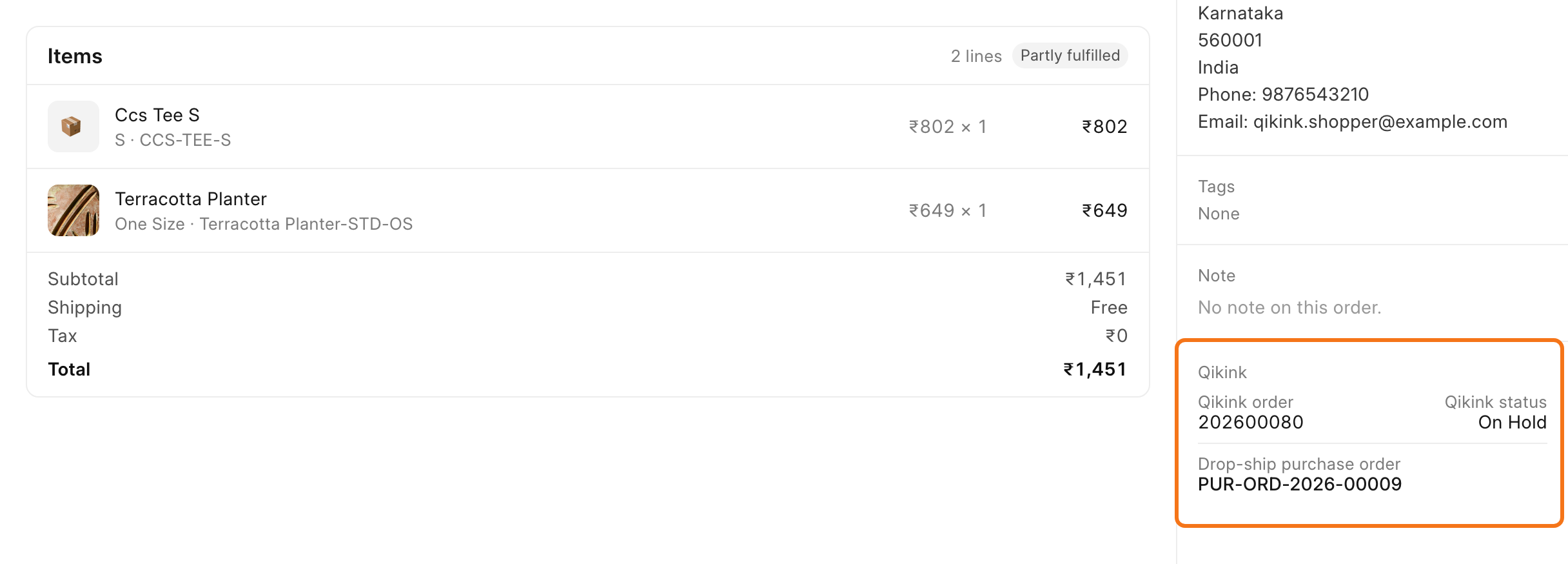
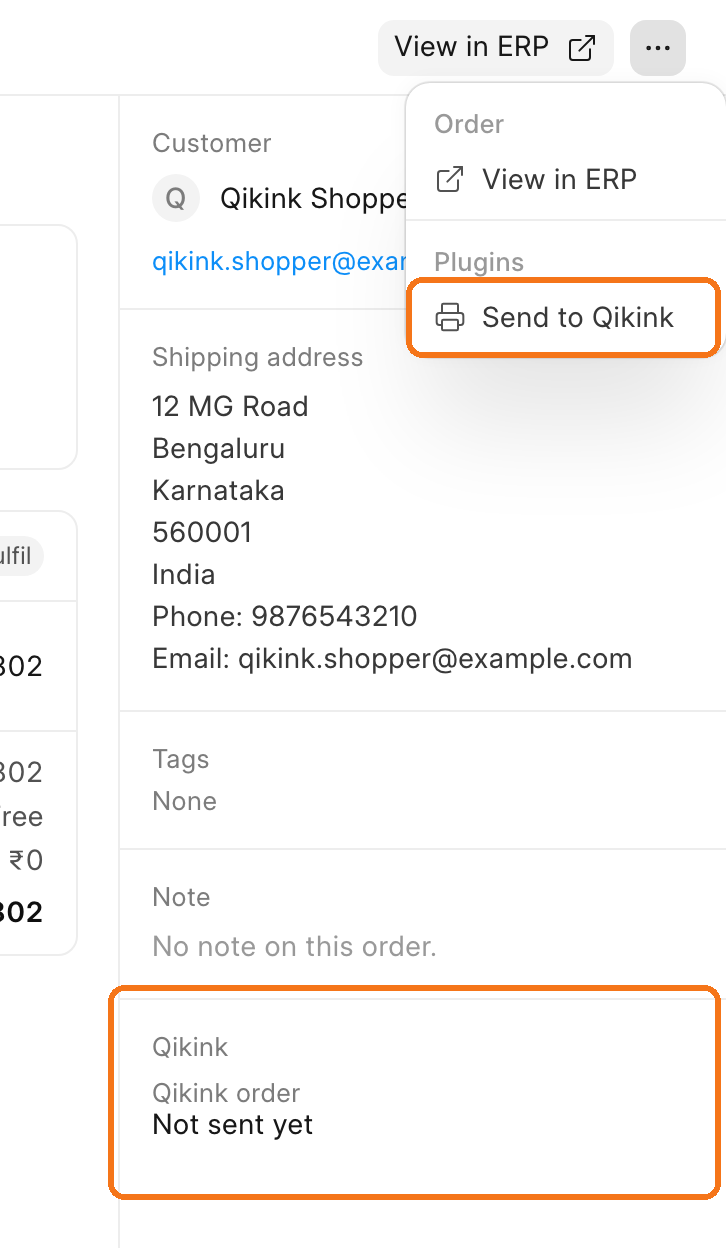
In this step, you show Qikink on the order page in /commera. A Qikink card shows the Qikink order number, the status, the drop-ship Purchase Order and the shipments. A Send to Qikink action sends a cash on delivery (COD) order.
Code for this step: feat: show qikink on the order page and send cod orders from it. Later tidied in refactor: use frappe utilities across the app. The code on this page is the tidied version.
What you'll build
commera/order/cards/qikink/index.vue, a card on the order page.commera/order/actions/send-to-qikink/index.vue, a row in the More actions menu.- Two whitelisted methods and a condition.
1. Read the card data
Create commera_qikink/order_card.py:
import frappe

from commera_qikink.orders import has_qikink_lines


def get_order_card(sales_order: str) -> dict:
	order_number, status = frappe.db.get_value(
		"Sales Order", sales_order, ["commera_qikink_order_number", "commera_qikink_status"]
	)
	return {
		"has_qikink_lines": has_qikink_lines(sales_order),
		"order_number": order_number,
		"status": status if order_number else None,
		"purchase_orders": get_purchase_orders(sales_order),
		"shipments": get_shipments(sales_order),
	}


def get_purchase_orders(sales_order: str) -> list[str]:
	return frappe.get_all(
		"Purchase Order Item",
		filters={"sales_order": sales_order, "docstatus": 1},
		pluck="parent",
		distinct=True,
		order_by="parent",
	)


def get_shipments(sales_order: str) -> list[dict]:
	if "bwh_shipping" not in frappe.get_installed_apps():
		return []
	return frappe.get_all(
		"Shipping Request",
		filters={"ref_doctype": "Sales Order", "ref_docname": sales_order, "docstatus": ["<", 2]},
		fields=["name", "awb", "carrier", "status", "tracking_url"],
		order_by="creation",
	)
The AWB and tracking link live on the order's Shipping Request, not on the Sales Order. You write them in Keep status in sync.
Add has_qikink_lines to orders.py:
def has_qikink_lines(sales_order: str) -> bool:
	item_codes = frappe.get_all("Sales Order Item", filters={"parent": sales_order}, pluck="item_code")
	return bool(get_qikink_items(item_codes))
2. Add the methods
In commera_qikink/api.py:
@frappe.whitelist(methods=["GET"])
def get_order_card(sales_order: str) -> dict:
	frappe.has_permission("Sales Order", "read", doc=sales_order, throw=True)
	return order_card.get_order_card(sales_order)


@frappe.whitelist(methods=["POST"])
def send_order(name: str) -> str:
	frappe.has_permission("Sales Order", "write", doc=name, throw=True)
	order_number = orders.send_order(name)
	if not order_number:
		frappe.throw(_("Order {0} has no Qikink items to send.").format(name))
	return _("Sent to Qikink as order {0}").format(order_number)
3. Build the card
In apps/commera_qikink, run bench commera add order-card qikink. Replace the commera/order/cards/qikink/index.vue it writes with this. The card hides itself on orders without Qikink lines.
<script>
export const plugin = { label: 'Qikink' };
</script>

<script setup>
import { computed, watch } from 'vue';
import { Skeleton } from 'frappe-ui';
import { useCard, usePlugin, useMethodRead } from '@commera/admin';

const { record } = usePlugin();
const card = useCard();

const cardRequest = useMethodRead('commera_qikink.api.get_order_card', {
	params: () => ({ sales_order: record.value.name }),
});

const qikink = computed(() => cardRequest.data);
watch(qikink, (data) => card.setHidden(!!data && !data.has_qikink_lines), { immediate: true });
</script>

<template>
	<Skeleton v-if="cardRequest.loading && !qikink" class="h-16 w-full rounded-4" />
	<div v-else-if="qikink" class="divide-y divide-outline-gray-1">
		<div class="flex items-start justify-between gap-3 pb-2">
			<div class="min-w-0">
				<p class="text-sm text-ink-gray-5">Qikink order</p>
				<p class="truncate text-base text-ink-gray-8 tabular-nums">{{ qikink.order_number || 'Not sent yet' }}</p>
			</div>
			<div v-if="qikink.order_number" class="min-w-0 text-right">
				<p class="text-sm text-ink-gray-5">Qikink status</p>
				<p class="truncate text-base text-ink-gray-8">{{ qikink.status }}</p>
			</div>
		</div>
		<div v-if="qikink.purchase_orders.length" class="py-2">
			<p class="text-sm text-ink-gray-5">Drop-ship purchase order</p>
			<a
				v-for="purchaseOrder in qikink.purchase_orders"
				:key="purchaseOrder"
				:href="`/desk/purchase-order/${purchaseOrder}`"
				target="_blank"
				class="block truncate text-base font-medium text-ink-gray-8 hover:underline"
			>
				{{ purchaseOrder }}
			</a>
		</div>
		<div v-for="shipment in qikink.shipments" :key="shipment.name" class="flex items-start justify-between gap-3 py-2 last:pb-0">
			<div class="min-w-0">
				<p class="text-sm text-ink-gray-5">{{ shipment.carrier || 'Courier not named' }} · {{ shipment.status }}</p>
				<p class="truncate text-base text-ink-gray-8 tabular-nums">AWB {{ shipment.awb }}</p>
			</div>
			<a
				v-if="shipment.tracking_url"
				:href="shipment.tracking_url"
				target="_blank"
				rel="noopener"
				class="shrink-0 text-base font-medium text-ink-gray-8 hover:underline"
			>
				Track
			</a>
		</div>
	</div>
</template>
4. Add the Send to Qikink action
An action with a method needs no template. In apps/commera_qikink, run bench commera add order-action send-to-qikink. Replace the commera/order/actions/send-to-qikink/index.vue it writes with this, and delete the send_to_qikink_order stub it adds to api.py: this action calls send_order.
<script>
export const plugin = {
	label: 'Send to Qikink',
	icon: 'printer',
	condition: 'commera_qikink.conditions.can_send_order',
	method: 'commera_qikink.api.send_order',
	confirm: 'Qikink will print and ship this order, and a Purchase Order to Qikink is made. Qikink cannot cancel an order once it has it.',
};
</script>
Add the condition to commera_qikink/conditions.py. A card or action condition gets (doctype, name).
from commera_qikink.orders import has_qikink_lines


def can_send_order(doctype: str, name: str) -> bool:
	order = frappe.db.get_value(
		"Sales Order", name, ["docstatus", "commera_qikink_order_number"], as_dict=True
	)
	return bool(
		order
		and order.docstatus == 1
		and not order.commera_qikink_order_number
		and frappe.has_permission("Sales Order", "write", name)
		and has_qikink_lines(name)
	)
Check it works
- Keep
yarn devrunning inapps/commera/dashboard, or runbench build --app commera_qikink. - Open a prepaid order that your plugin sent, for example
SAL-ORD-2026-00077. The Qikink card shows the Qikink order number, Sent and the Purchase Order. - Place a COD order on the storefront. Open it in
/commera. The card shows Not sent yet. - Open the order in Desk and click Submit.
- In
/commera, open More actions and click Send to Qikink. Confirm. The toast shows "Sent to Qikink as order …". - In
bench --site <site> console, runQikink().find_order("<number>"). The order haspayment_typeCOD.