.webp)



Step 5: Override a theme
In this step, you make Acme Catalog, a child of Summer Theme that hides every price. Use this pattern for a catalogue store, a trade showroom, or a store that shows prices only on request. Acme Catalog changes three templates, adds one controller, and gets all other files from Summer Theme.
What you'll build
- The Acme Catalog theme record, with Summer Theme as its parent
- Three override files that remove the price from product cards, the product page and search results
- A product page controller that removes the price from the page head
The override rule
A file in the child theme at the same components/... or pages/... path as a file in the parent replaces the parent's file. Every file that the child does not have comes from the parent.
- You copy the whole file. There is no partial override of one block or one macro in a file.
- Only files under
components/andpages/can be overridden. Commera's core files, undertemplates/..., cannot.
Why a template override, not CSS
You could hide the prices with one CSS rule, such as .shop-card-price { display: none; }. Do not do this:
- The prices stay in the HTML. Search engines, scrapers, reader views and screen readers still get them.
- The rule depends on class names. A Summer Theme update can rename them, and the prices come back.
A template override removes the price from the HTML. With Acme Catalog, the home page, the product list and the product page show no price on the page.
1. Create the theme record
-
In Desk, open the Shop Theme list and click + Add Shop Theme.
-
Fill in the form:
Field Value Theme Name Acme CatalogModule Acme Theme, not the defaultShop ThemesIs Standard Ticked Parent Theme Summer ThemeTheme Settings Summer Theme Settings -
Click Save.
Commera makes the empty folders in acme_theme/themes/acme_catalog/ and acme_theme/public/themes/acme_catalog/.
2. Find the files that print a price
Summer Theme's files are in the Commera app, in its theme folder named summer_theme. Read them and look for each place that prints a price. Summer Theme prints a price in three files:
| File | What it prints |
|---|---|
components/macros/product_card.html |
The card_price macro. Every product card calls it: list, featured, deals, related, recently added and similar products. |
components/sections/product_info.html |
The You save and Total table on the product page |
components/overlays/search_canvas.html |
The price on each search result |
3. Override the product card
- Copy Summer Theme's
components/macros/product_card.htmltoacme_theme/themes/acme_catalog/components/macros/product_card.html. - Make the
card_pricemacro print nothing:
-{% macro card_price(amount, original_amount=0, discount=0) -%}
-{{- get_currency_symbol() }}{{ frappe.utils.fmt_money(amount or 0, precision=2) -}}
-{%- if discount %}<del>{{ get_currency_symbol() }}{{ frappe.utils.fmt_money(original_amount or 0, precision=2) }}</del>{% endif -%}
-{%- endmacro %}
+{# Acme Catalog is a catalogue without prices: every card that calls card_price renders nothing. #}
+{% macro card_price(amount, original_amount=0, discount=0) -%}{%- endmacro %}
Keep the macro and its arguments. The other files call card_price(...), and a missing macro breaks them.
4. Override the product page's price table
- Copy Summer Theme's
components/sections/product_info.htmltoacme_theme/themes/acme_catalog/components/sections/product_info.html. - Remove the price table above the wishlist button:
 				{% endif %}
-				<table>
-					<tbody>
-						{% if discount_percent %}
-						<tr>
-							<td><h6 class="mb-0">{{ _("You save") }}</h6></td>
-							<td class="price">{{ get_currency_symbol() }}<span x-text="(qty * (default_price - price)).toFixed(2)">{{ "%.2f" | format(default_price - selected_price) }}</span></td>
-						</tr>
-						{% endif %}
-						<tr class="total">
-							<td><h6 class="mb-0">{{ _("Total") }}</h6></td>
-							<td class="price">
-								{{ get_currency_symbol() }}<span x-text="(qty * price).toFixed(2)">{{ "%.2f" | format(selected_price or 0) }}</span>
-								{% if discount_percent %}<del>{{ get_currency_symbol() }}<span x-text="(qty * default_price).toFixed(2)">{{ "%.2f" | format(default_price or 0) }}</span></del>{% endif %}
-							</td>
-						</tr>
-					</tbody>
-				</table>
 				<button type="button" class="btn btn-outline-secondary btn-icon m-b20 w-100" @click="toggle_wishlist()">
Keep price and default_price in the x-data at the top of the file. The Add To Cart button sends them to the cart.
5. Override the search results
- Copy Summer Theme's
components/overlays/search_canvas.htmltoacme_theme/themes/acme_catalog/components/overlays/search_canvas.html. - Remove the price block from the result card:
 								<h5 class="title"><a :href="get_product_url(product)" x-text="get_product_name(product)"></a></h5>
-								{# Concatenating the currency symbol into x-text would escape it, so Jinja stamps it beside the amount. #}
-								<h5 class="price">
-									{{ get_currency_symbol() }}<span x-text="format_amount(product.effective_price)"></span>
-									<template x-if="product.has_discount">
-										<del>{{ get_currency_symbol() }}<span x-text="format_amount(product.default_price)"></span></del>
-									</template>
-								</h5>
 							</div>
This file loads shop_theme_asset_url('js/summer_search.js'). Acme Catalog has no such script, so the helper returns Summer Theme's copy.
6. Remove the price from the page head
Commera's product controller adds the price to the page head: to the JSON-LD for search engines, and to the og:price:amount meta tag. No template prints these values, so a template override cannot remove them. Remove them in a controller.
Create acme_theme/themes/acme_catalog/pages/products/details.py:
from commera.www.products import details


def get_context(context):
	details.get_context(context)
	context.seo["price"] = None
	context.seo["currency"] = None
	for json_ld in context.json_ld:
		json_ld.pop("offers", None)
	return context
The controller calls Commera's product controller first, then removes the price from context.seo and the offers entry from each JSON-LD block. Acme Catalog has no details.html, so Summer Theme's template renders the page with the context from this controller.
Your theme now has these files:
acme_theme/themes/acme_catalog/
├── components/
│   ├── macros/product_card.html
│   ├── overlays/search_canvas.html
│   └── sections/product_info.html
└── pages/
    └── products/details.py
Check it works
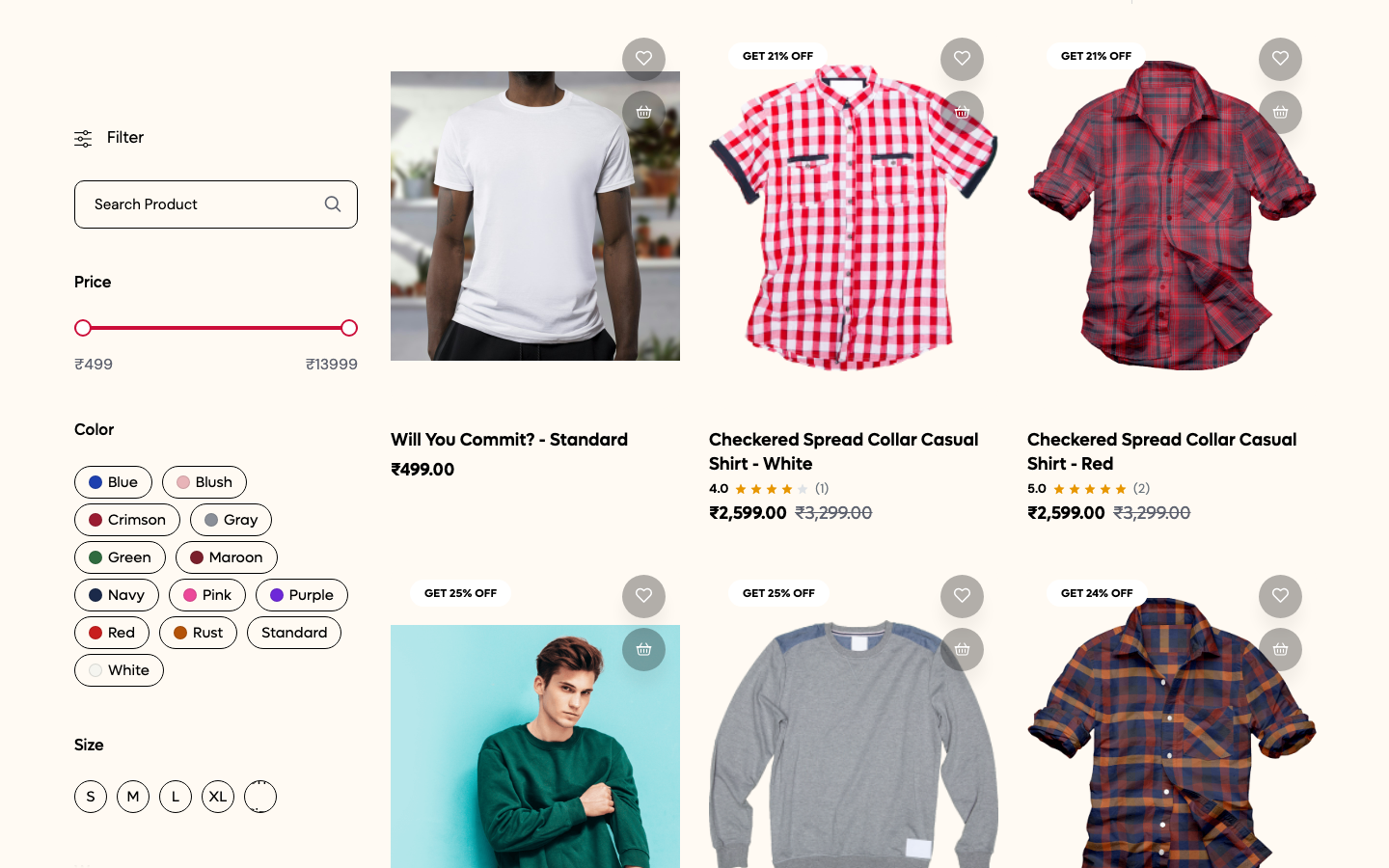
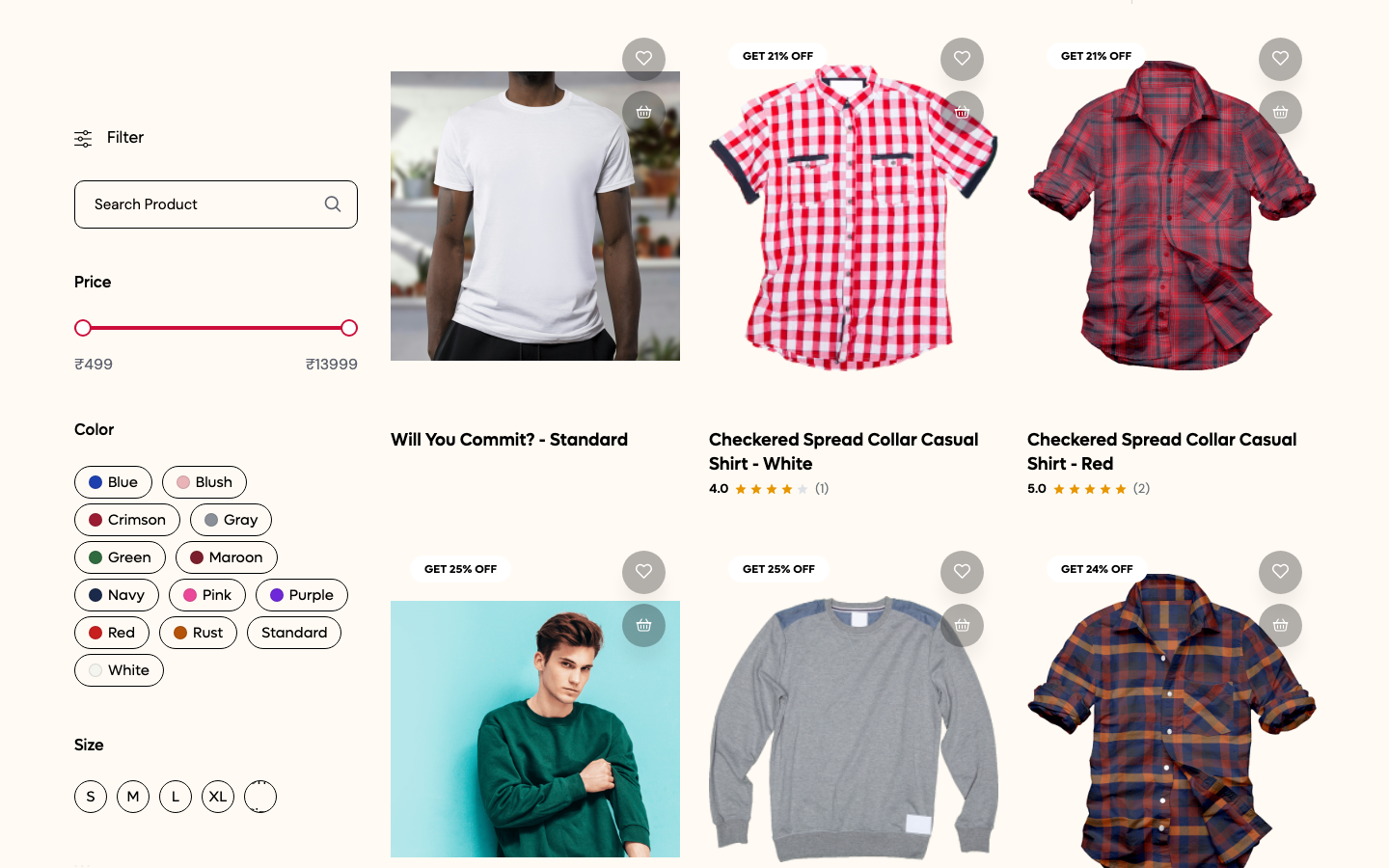
Open /en/products?preview_theme=Acme%20Catalog. The cards keep their names, ratings and discount badges, and have no prices.
Before, with Summer Theme:
After, with Acme Catalog:
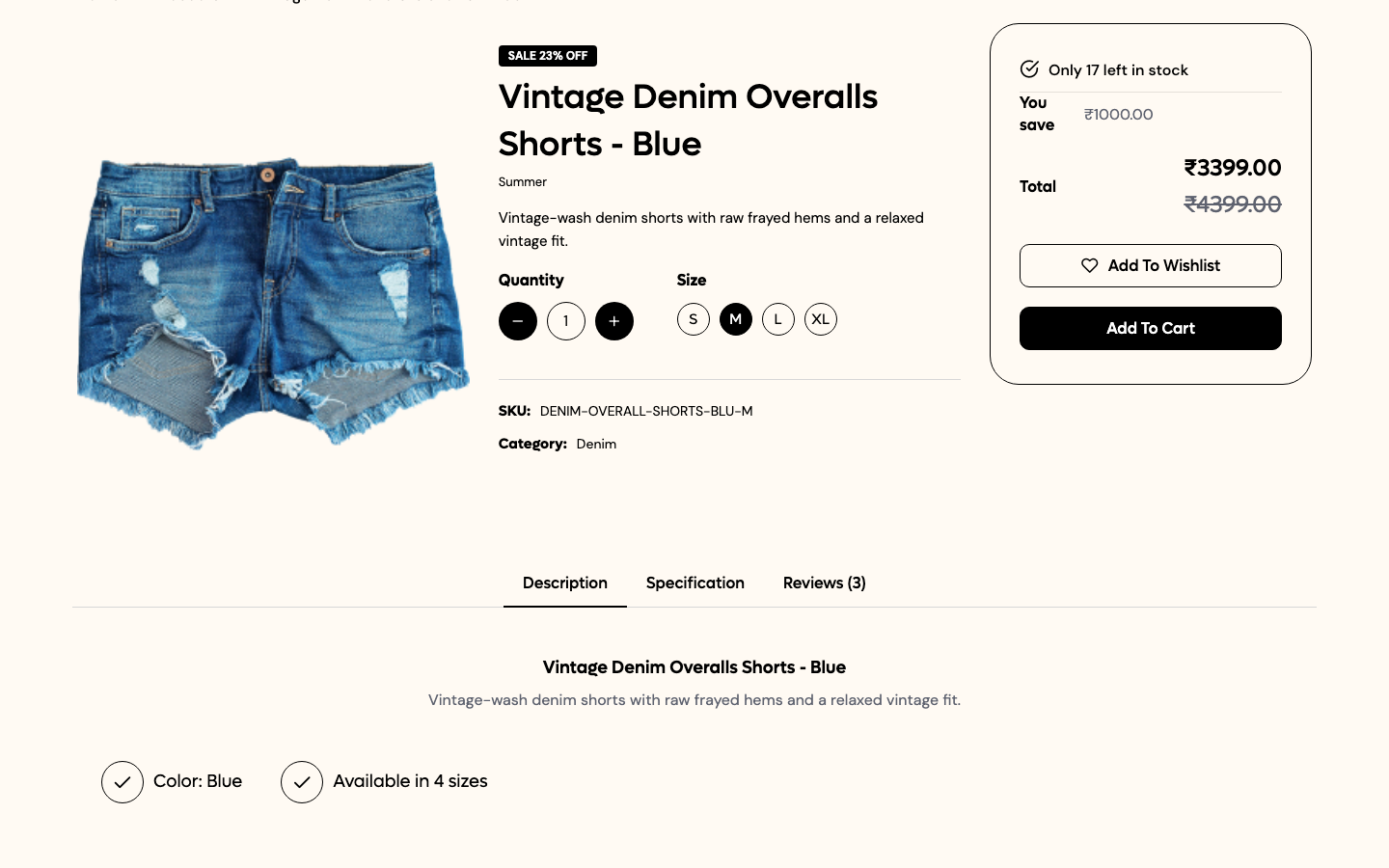
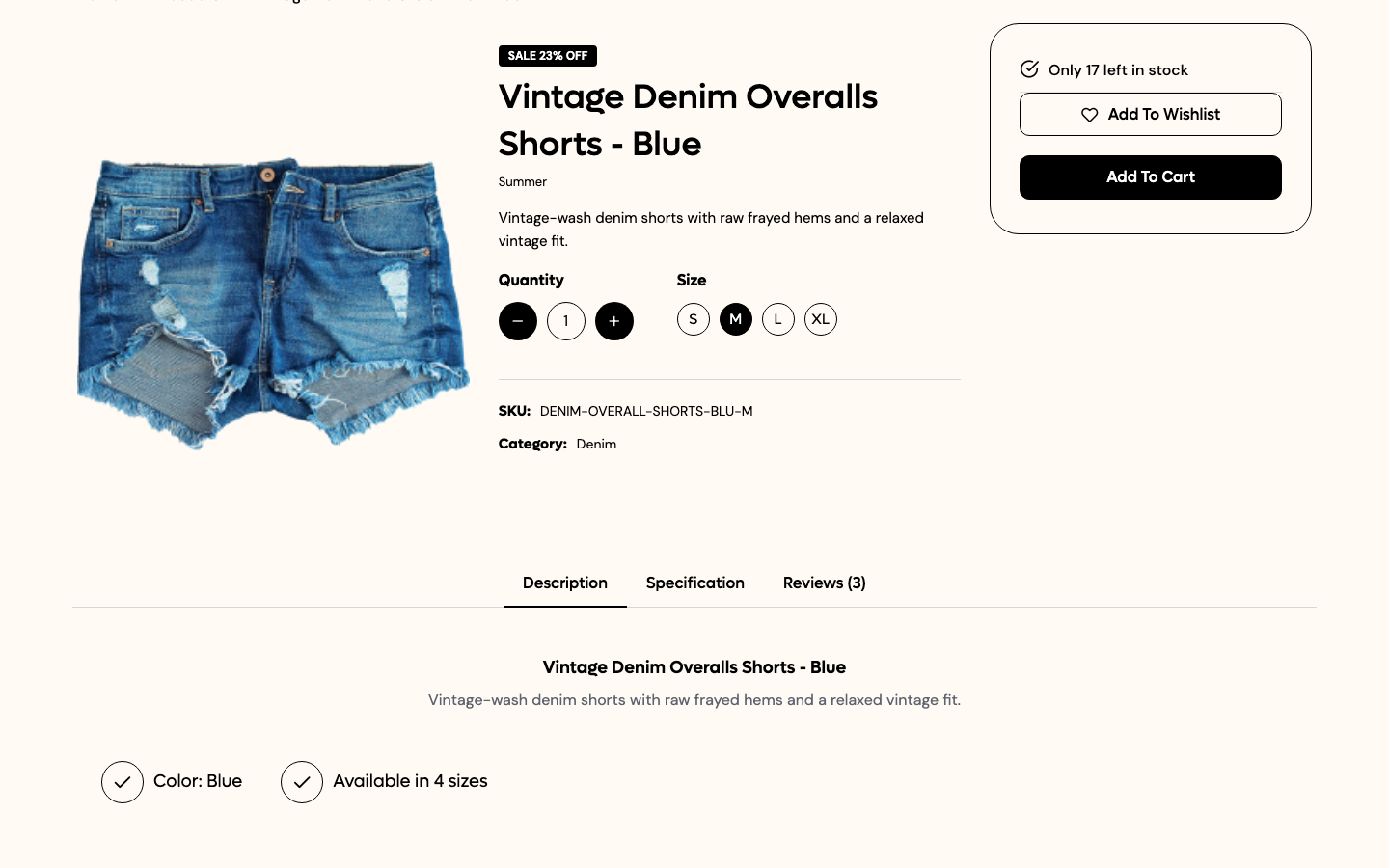
Open a product with ?preview_theme=Acme%20Catalog&size=M. The You save and Total table is gone. Add To Cart still works. The page source has no og:price:amount tag, and its JSON-LD has no offers.
Before, with Summer Theme:
After, with Acme Catalog:
When Summer Theme changes one of the three templates in a Commera update, your copy does not get the change. After each update, compare your copies with the new parent files.
Next steps
- Step 6: Preview and ship
- Architecture: the full fallback order
- Gotchas: problems that theme authors hit