.webp)



Step 13: Test and ship
In this step, you write tests for the money paths, build the dashboard entries for production, and publish the plugin. You also learn how to find and retry an event delivery that failed on a live site.
Code for this step: test: cover sending, tokens, cart refusal and gateways, and document the app
What you'll build
commera_qikink/test_orders.py, with Qikink's HTTP calls replaced by fakes.- A production build of the dashboard entries.
- A public repository that a store can install from.
1. Fake Qikink at module scope
Your client calls make_get_request and make_post_request by the names that it imported. Patch those names in commera_qikink.client, not in frappe.integrations.utils. Then no test reaches Qikink.
from unittest.mock import patch

import frappe
from frappe.tests import IntegrationTestCase

from commera_qikink import orders
from commera_qikink.client import Qikink


class TestSendOrder(IntegrationTestCase):
	def setUp(self):
		self.sales_order = make_order()
		self.order_number = orders.get_order_number(self.sales_order.name)
		self.qikink_orders = []
		self.created = []
		self.create_reply = {"order_id": 1, "number": f"654367_{self.order_number}"}
		patchers = (
			patch("commera_qikink.client.make_get_request", side_effect=self.fake_get),
			patch("commera_qikink.client.make_post_request", side_effect=self.fake_post),
			patch.object(Qikink, "get_token", return_value="test-token"),
			patch.object(frappe.db, "commit"),
		)
		for patcher in patchers:
			patcher.start()
			self.addCleanup(patcher.stop)

	def fake_get(self, url, headers=None, params=None):
		return self.qikink_orders if params.get("page_no") == 1 else []

	def fake_post(self, url, headers=None, json=None, data=None):
		self.created.append(json)
		return self.create_reply
make_order submits a Sales Order for a mapped Qikink item. Write it once in a test module and import it in the others. The commit has a version that copies an existing store order.
2. Test the rules that cost money
Test that an order goes to Qikink once:
	def test_an_order_is_sent_once(self):
		self.assertEqual(orders.send_order(self.sales_order.name), self.order_number)
		self.assertEqual(orders.send_order(self.sales_order.name), self.order_number)

		self.assertEqual(len(self.created), 1)
		self.assertEqual(self.created[0]["order_number"], self.order_number)
Test that a retry adopts the order that Qikink already has:
	def test_a_retry_adopts_the_order_qikink_already_has(self):
		self.sales_order.db_set("commera_qikink_status", orders.SENDING_STATUS)
		self.qikink_orders = [{"order_id": 1, "number": f"654367_{self.order_number}", "status": "On Hold"}]

		self.assertEqual(orders.send_order(self.sales_order.name), self.order_number)
		self.assertEqual(self.created, [])
Write a test for each of these rules too:
- A refused order stays Sending, with no order number.
- An order number over 15 digits throws.
- A mixed order sends only the Qikink lines' value.
- An unpaid COD order goes as
COD, and every other order goes asPrepaid. - The cart refuses a Qikink item without a SKU.
- The status sync records a shipment and delivers the Purchase Order on Delivered. Return the fake Qikink orders from
fake_get. - A sent order refuses to cancel, and the cancel works after Mark cancelled on Qikink. These tests went in with Handle cancellations, in
test_cancellations.py.
Run the tests:
bench --site <site> set-config allow_tests true
bench --site <site> run-tests --app commera_qikink
The finished plugin has 24 tests in four modules: test_orders.py, test_order_status.py, test_client.py and test_cancellations.py.
Read Testing to fire Commera events inside a test.
3. Build for production
The dashboard's yarn dev rebuilds your plugin while you work. Before you ship, run a production build:
bench build --app commera_qikink
The build checks each dashboard entry. It refuses an unknown field, a dotted path outside your plugin, or an unsafe plugin-icon.svg. Then run bench build --app commera too, so the dashboard's stylesheet has your plugin's classes.
4. Watch deliveries on a live site
Commera lists each event delivery to your plugin in /commera, under Settings > Plugins > Open > Recent deliveries. The dashboard and Desk use different status names. Events lists both.
When your handler raises, Commera writes an Error Log titled commera_events["order_paid"] hook failed: commera_qikink.orders.on_order_paid and retries later. After the sixth failed attempt, the delivery is Failed.
- Open Error Log in Desk and read the traceback.
- Fix the cause, for example a missing SKU or wrong Qikink keys.
- In
/commera, open the order. A failed delivery shows a red alert, "couldn't process this order". It is also on the Failed tab of Recent deliveries. - As a System Manager, click Retry.
Your send_order adopts an order that Qikink already has, so a retry is safe.
5. Publish the plugin
- Write a
README.mdwith the install commands and the setup steps. - Push the plugin to a public Git repository.
- Tell stores to install it:
bench get-app https://github.com/<you>/commera_qikink
bench --site <site> install-app commera_qikink
bench build --app commera_qikink
bench restart
Read Compatibility before you publish. It lists the Commera versions that your hooks and SDK calls need. The finished plugin is at github.com/Rl0007/commera_qikink.
Check it works
- Run
bench --site <site> run-tests --app commera_qikink. The output ends withRan 24 testsandOK. - Run
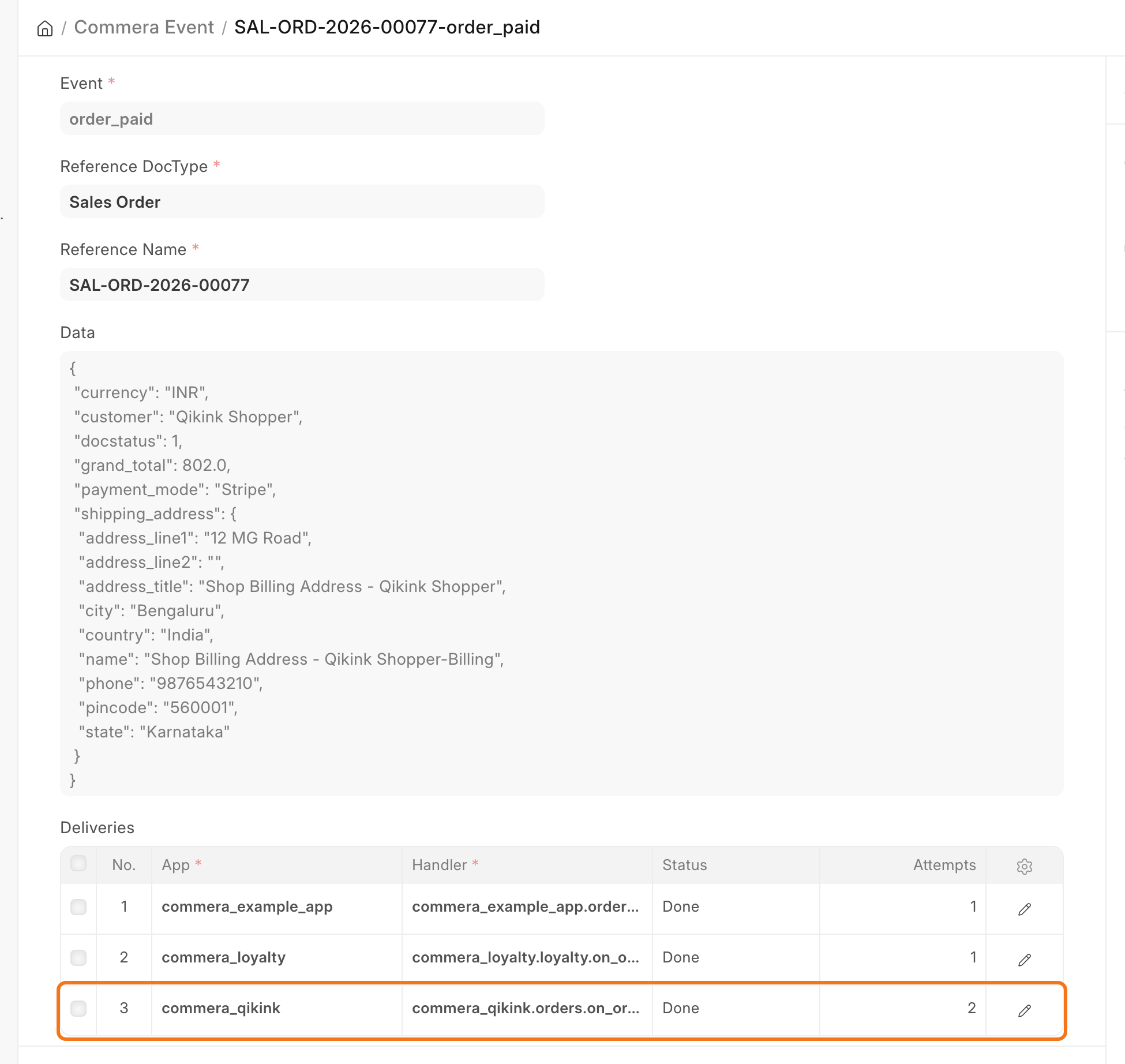
bench build --app commera_qikink. It ends without an error. - In Desk, open the Commera Event of an order that your plugin sent, for example
SAL-ORD-2026-00077-order_paid. In Deliveries, thecommera_qikinkrow shows Done. In/commera, Settings > Plugins shows the same delivery as Sent, and the order page shows no red alert.