.webp)




Make delivery free, or cheaper, when the order is above a set amount.
Meera's standard delivery costs ₹99 and is already free over ₹999. For Diwali she wants free delivery from ₹499, so a single pack of tea ships free.
Before you start
Set up at least one delivery option. See Set up shipping.
Steps
-
Go to Discounts, click Create discount and pick Free shipping.
-
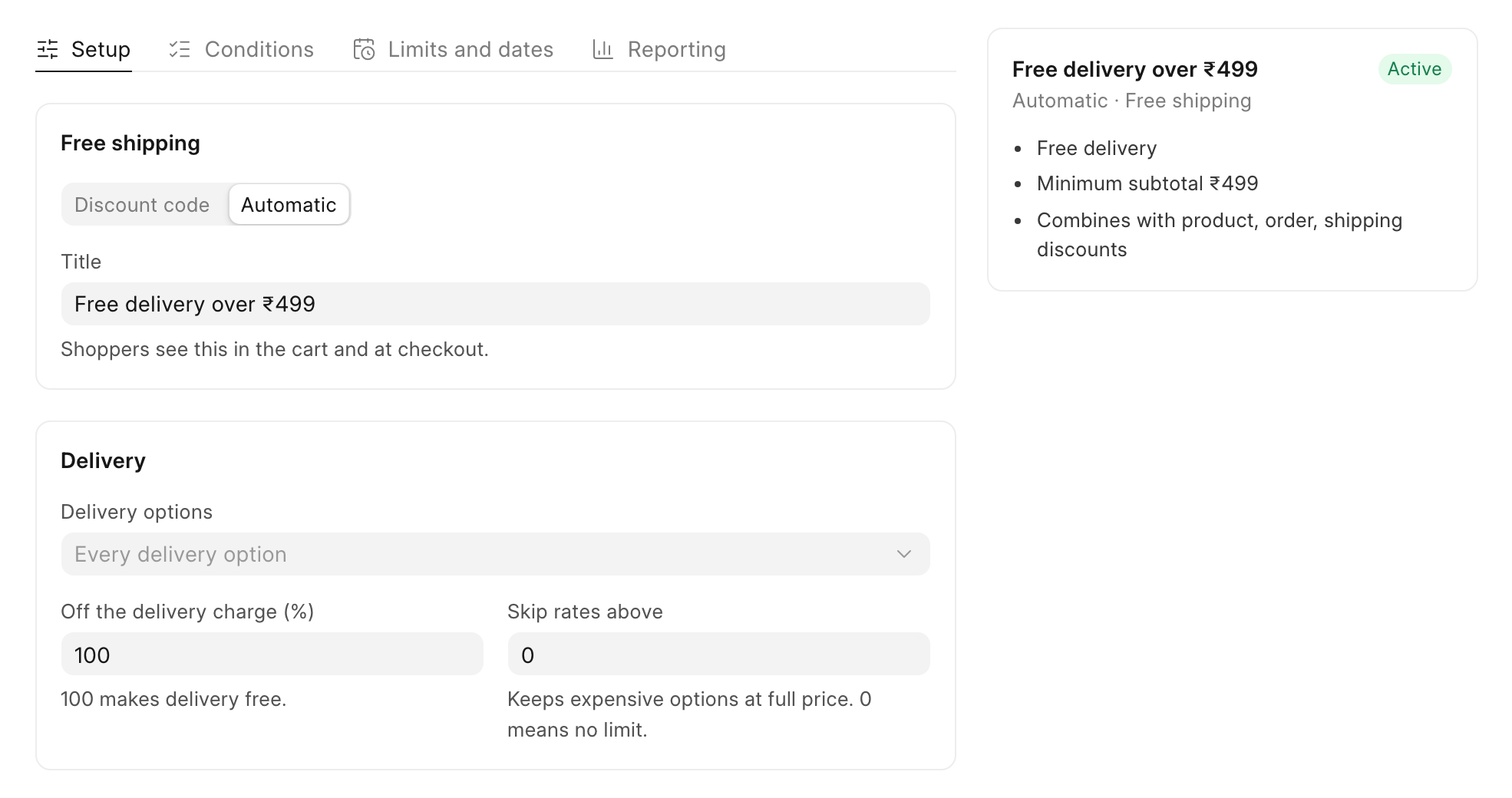
Click Automatic and type a Title, such as "Free delivery over ₹499". To give free delivery only to people with a code, keep Discount code and type a Code instead.
-
Under Delivery, leave Delivery options empty for "Every delivery option", or pick the options it covers.
-
Keep Off the delivery charge (%) at 100. "100 makes delivery free." Type 50 for half-price delivery.
-
To keep costly options, such as express delivery, at full price, type an amount in Skip rates above. 0 means no limit.
-
Open the Conditions tab. Under Minimum purchase, select Minimum subtotal and type 499 in Subtotal.
-
Click Save.
Check it worked
As a shopper, put one ₹540 tea in the cart and go to checkout. After you pick Standard Delivery, the Order summary shows "Shipping discount (Free delivery over ₹499)" with −₹99, and the order total goes down by ₹99.